Buyer's guide
Data Studio template vs custom dashboard: when a free template is enough and when to pay for a build
The Data Studio template vs custom dashboard choice comes down to one question: does a template already measure your business the way you define it? This guide is for marketing managers, founders and analysts deciding whether to copy a free template, adapt one, or pay for a dashboard built around their own data. I explain what actually happens when you swap a template's data source, what templates cannot give you, and how to decide with a seven-question checklist.
Quick answer
Should I use a Data Studio template or build a custom dashboard?
Use a Data Studio template when you report on one standard source, such as GA4 or Google Ads, with standard metrics and few viewers. Choose a custom dashboard when you combine several sources, need your own definitions of revenue or leads, report to many people, or need the numbers to tie to finance. Adapting a template is a sound middle option.
- Templates are copies of someone else's report; your data and definitions are what make it yours.
- Google does not remap calculated fields or filters when you replace a template's data source.
- Many vendor templates only work with that vendor's paid connector, which is the real price.
- Custom pays off with several sources, many viewers or numbers that must match finance.
Data Studio template vs custom dashboard: which should you choose?
Pick the option that matches your sources, your definitions and your audience. A template wins on speed when all three are standard. A custom dashboard wins when any one of them is specific to your business, because that is where templates break or quietly mislead.
The table below covers the situations I see most often. Read across your row and the answer is usually clear.
| Your situation | Template | Adapted template | Custom build |
|---|---|---|---|
| One GA4 property or one Google Ads account, standard metrics | Good fit | Optional | Usually not needed |
| Two or three marketing sources, shared date and channel | Often breaks on field names | Good fit | Fit if definitions matter |
| Your own definition of a lead, a customer or revenue | Poor fit | Possible with calculated fields | Good fit |
| Finance figures that must tie to the books | Poor fit | Risky | Good fit |
| Many viewers opening GA4 pages at once | Quota errors likely | Fixable with fewer charts | Good fit, designed for load |
| A quick internal look before deciding what to measure | Good fit | Not needed yet | Too early |
What is a Data Studio template, really?
A Data Studio template is an existing report that you copy and point at your own data. There is no separate template format: you make a copy, and Data Studio asks which data source should replace the original one. Everything else, from page layout to chart choices, comes across as the author built it.
Templates come from three places. Google publishes example reports. Individual builders share reports on blogs and marketplaces. Connector vendors run galleries tied to their own connectors: Windsor.ai's gallery, read in November 2026, lists more than 60 templates, which are free to copy but deliver data through Windsor.ai connectors. Its gallery page states the free plan covers one source, and multi-platform reports need paid plans from $19 a month for three sources.
That last point is the one buyers miss. A free template built on a vendor's connector is a sales channel for that connector. That can be perfectly fine, but compare the connector's yearly cost with the cost of building on native connectors or a Sheet you already maintain.
What breaks when you swap a template's data source?
More than most template pages admit. Google's own Data Studio documentation, read on November 4, 2026, explains that when you replace a data source, Data Studio tries to map old fields to new ones using the field ID, the field name and other configuration from the report. Where it cannot find a match, the chart shows a message that its configuration is incomplete, with invalid or missing dimensions, metrics or filters, and you fix each chart by hand.
Two lines in that documentation matter most. Data Studio will not try to map your old fields inside calculated fields and filters, so every formula and filter in the template has to be checked and often rewritten. And Google strongly recommends reviewing the entire report for accuracy after replacing any data source. Windsor.ai's gallery gives the same warning from the vendor side: field names can differ between connectors, so calculated fields need verifying when you switch, and the date range, time zone and reporting level must match.
The dangerous failures are the silent ones. A chart that errors is easy to spot. A conversion rate built on a field that mapped to the wrong metric still shows a tidy percentage, and nobody notices until someone compares it with the source platform.
- Calculated fields that reference the template author's field names or custom events.
- Filters that exclude the author's internal traffic, test campaigns or a country you sell to.
- Blends whose join keys exist in the author's data but not in yours.
- Custom channel groupings or CASE statements that follow the author's naming conventions.
- Date ranges and comparison periods that assume a calendar the author used.
What does a template not give you?
A template gives you a layout. It cannot give you your business's definitions, your data cleaning, or a design built for the way your team uses the report.
Definitions are the biggest gap. A template's leads metric counts whatever event the author counted. If your sales team only counts a form fill from a business email as a lead, the template is wrong for you on day one. The same applies to revenue net of refunds, new versus returning customers, or cost per acquisition that includes agency fees.
Templates also ignore the platform's limits. Blends are limited to 5 sources and equality joins only, so a template that blends three sources may fail once you add your fourth and fifth. Fixed-schema sources such as GA4 and Google Ads allow 10 dimensions and 20 metrics per table, so a wide template table may not survive a source swap. And the GA4 Data API allows 14,000 tokens per project per property per hour on standard properties. Many templates pack 20 or more charts onto one page, and every chart sends its own query, so ten managers opening that page on Monday morning can push the property into quota errors.
Finally, ownership. A template you copy belongs to you, but if someone else copied it and connected the data sources with their credentials, the report stops when their access ends. Data Studio gives no warning when a connector breaks.
When does adapting a template make sense?
Adapting a template is the right middle option when the layout suits you and the sources are close to the author's, but the definitions need work. It is often the cheapest route to a report your team trusts.
Treat the template as a wireframe, not a finished product. Copy it, replace the data source, fix every chart that reports incomplete configuration, rewrite the calculated fields against your own fields, remove pages you will not use, and reconcile the key numbers against the source platform before sharing. If that list takes more than a day, or you find yourself rebuilding most charts, you are already doing a custom build with someone else's layout constraints.
A worked example: one marketing team, three routes
Take an ecommerce marketing manager who wants GA4, Google Ads and store revenue in one weekly report for six people.
Route one is a free vendor template. It covers GA4 and Google Ads well, but store revenue comes through the vendor's connector, so the team now needs a paid plan for three sources. The template's revenue chart uses GA4 purchase revenue, which differs from the store's own figure once refunds and cancelled orders are counted, so the CEO sees two revenue numbers.
Route two adapts a GA4 and Google Ads template on native connectors and adds store revenue from a Google Sheet the finance team already updates. The manager rewrites the revenue calculated field to use the store figure, trims the first page to the eight charts that matter, and reconciles last month against the store and Google Ads. This is often the best answer for a team of this size.
Route three is a custom build. It makes sense if the team also needs cost per new customer across channels, several stores or currencies, or numbers the finance lead will sign off. At that point the data should be joined in one table, often in BigQuery, before the report reads it, because stacking blends will not hold.
Checklist: before you copy any Data Studio template
Run through this list before committing a template to your team. Each question takes a minute, and a no on any of the first four is a reason to adapt heavily or build.
- Does the template use native connectors, or a vendor connector you would need to pay for?
- Do its metrics match your definitions of a lead, a sale and revenue?
- Will your sources, accounts and properties fit within 5 blended sources and the table limits?
- How many charts per page will query GA4, and how many people will open it at once?
- Who will own the copied report and the data source credentials?
- Can you list every calculated field and filter, and check each after the swap?
- Will you reconcile one recent month against each source before sharing?
When is a custom Data Studio dashboard not worth it?
When the question is simple and the audience is small. If one person checks GA4 traffic and Google Ads spend once a week, a well-chosen template, or the platforms' own reports, will do. Paying for custom work to get the same three charts in nicer colours is poor value.
It is also too early when you do not yet know what you want to measure. Start with a template, watch which pages people actually open for a month, and then decide what deserves a proper build. Custom work pays off when the report drives decisions, combines several sources, serves many viewers, or must agree with finance.
How I approach template and custom work
I start with a free review of the report you have, or the template you are considering, and the decisions it must support. If an adapted template will hold up, I say so and quote that, because rebuilding a layout that already works wastes your budget. If it will not, I quote a fixed price for a custom dashboard.
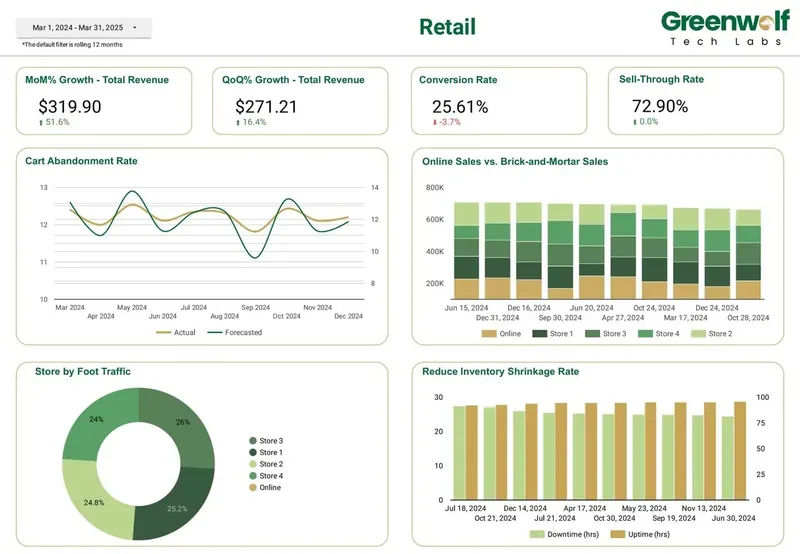
Dashboards from projects I've led at Greenwolf Tech Labs show why custom work exists: an insurance broker's membership and churn per client scheme, a pharma brand's sales and prescription volume against forecast, a retailer's sell-through rate and online versus in-store sales. No public template measures those. Every report I build lives in your account from day one, with documented calculated fields, so nothing depends on my login.
FAQ
Frequently asked questions
Are Data Studio templates free?
Most templates are free to copy, and Data Studio itself is free for creators and viewers. Many vendor templates, though, deliver data through that vendor's paid connector, so the real cost is the connector subscription. Templates built on native connectors such as GA4, Google Ads and Sheets carry no extra fee.
Can I use a Looker Studio template in Data Studio?
Yes. Looker Studio was renamed Data Studio in April 2026, and existing reports and templates moved over automatically. A template shared under the old name opens and copies the same way.
Why do my charts show errors after copying a template?
Because Data Studio could not map some of the template's fields to your data source. It matches fields by ID, name and report configuration, and it does not remap fields inside calculated fields and filters. Edit each affected chart and rewrite the formulas against your own fields.
Is a custom Data Studio dashboard worth paying for?
It is when you combine several sources, need your own definitions of leads or revenue, serve many viewers or need figures that tie to finance. For one standard source and a small audience, a template or an adapted template is usually enough.
Can I customize a Data Studio template?
Yes. A copied template is an ordinary report, so you can add pages, charts, calculated fields, parameters and filters. Check every calculated field and filter after you replace the data source, and reconcile key numbers against the source before sharing.
Why does my GA4 template show quota errors?
Templates often place many GA4 charts on one page, and each chart sends its own query against the property's hourly token budget of 14,000 tokens on standard properties. Fewer charts per page, extracts or a BigQuery export reduce the load.
Keep reading
Related pages
Get started
Tell me what the report has to answer
Send the question your team keeps asking and where the data lives today. I reply within one business day with how I would build it, which connectors it needs and what it would cost.
- Free 30-minute review of your data and reports
- A fixed price before any work starts
- Built in your Google account, so you own everything
Prefer email? harsh@greenwolftechlabs.com
Book a free review
Two lines is enough to start.