Connector guide
LinkedIn Ads to BigQuery: how to load it, what it costs and what breaks
Getting LinkedIn Ads to BigQuery takes a third-party connector, your own script against the LinkedIn Marketing API, or manual CSV uploads, because Google's BigQuery Data Transfer Service has no LinkedIn source. This guide is for marketing leads, B2B founders and analysts who want LinkedIn spend and results stored in their own warehouse, usually to report it in Data Studio beside the CRM. I compare the four routes with current prices, explain the LinkedIn API rules that quietly break pipelines, and show a table design that keeps the numbers right.

Quick answer
How do I connect LinkedIn Ads to BigQuery?
To connect LinkedIn Ads to BigQuery, use an ETL connector such as Windsor.ai, Coupler.io, Fivetran or Airbyte, or write a script against the LinkedIn Marketing API. Google's BigQuery Data Transfer Service does not support LinkedIn. Load daily rows into a date-partitioned table, re-pull recent days on each run, and report from a summary view.
- BigQuery Data Transfer Service lists Facebook Ads and Google Ads but no LinkedIn source.
- LinkedIn keeps campaign performance for ten years but job title and company breakdowns for two.
- For most accounts the connector subscription costs far more than BigQuery storage and queries.
- Home-built scripts fail on token expiry and API version sunsets unless someone maintains them.
Can you send LinkedIn Ads to BigQuery natively?
No. Neither LinkedIn nor Google offers a direct, built-in LinkedIn Ads to BigQuery transfer. I checked Google's BigQuery Data Transfer Service documentation on docs.cloud.google.com in November 2026: its marketing sources are Facebook Ads, HubSpot, Klaviyo and Mailchimp, alongside Google's own products such as Google Ads, Campaign Manager and GA4. LinkedIn Ads is not on the list.
That leaves four practical routes: a managed ETL connector, an open-source or self-hosted pipeline, your own code calling the LinkedIn Marketing API, or exporting CSV files from Campaign Manager and loading them by hand. All of them, including every paid connector, read the same LinkedIn API underneath, so LinkedIn's rules on retention, thresholds and tokens apply whichever one you choose.
Which LinkedIn Ads to BigQuery route should you choose?
Choose a managed connector if nobody on your team wants to own code, a script if you have an engineer and many accounts, and CSV uploads only for a one-off analysis. The table compares the routes on the points that decide most projects.
| Route | Typical cost | Effort to run | Best for | Main risk |
|---|---|---|---|---|
| Managed connector (Windsor.ai, Coupler.io) | Flat monthly plan | Low: authorise, pick fields, schedule | One to a few ad accounts, marketing-owned reporting | Fixed field lists; plan limits on accounts and refresh |
| Usage-priced ETL (Fivetran, Estuary) | Charged by rows or data volume | Low to medium | Teams already running a warehouse stack | Bills rise with demographic breakdowns |
| Own script on the Marketing API | Engineering time and hosting | High: auth, versions, retries | Many accounts, custom pivots, full control | Breaks on token expiry or version sunset |
| CSV export and manual load | Free | High every time | A single historical backfill or audit | Human error, no refresh |
How much does it cost to get LinkedIn Ads into BigQuery?
For a typical B2B account the connector is the main cost and BigQuery is close to free. These are list prices I read on each vendor's pricing page in November 2026; vendors change them often, so check before you buy.
Windsor.ai's Basic plan is $19 a month billed annually ($23 monthly) for 3 data sources with daily refresh, and its Standard plan is $99 a month annually with hourly refresh; BigQuery is included as a destination on every plan, and its forever free tier covers one source and one account. Coupler.io's Starter plan is $24 a month annually ($32 monthly) for 3 accounts with daily refresh, Active is $99 a month for 15 accounts, and Pro is $199 a month with hourly refresh. Fivetran prices by monthly active rows: its free plan includes 500,000 MAR a month, and paid plans add a $5 base charge per standard connection. Estuary's own LinkedIn Ads guide quotes $0.50 per GB moved plus $100 a month per connector instance.
On the BigQuery side, Google's published pricing gives the first 10 GiB of storage and the first 1 TiB of on-demand queries free each month, then $6.25 per TiB queried. LinkedIn performance rows are small and few, so a well-built LinkedIn dataset rarely leaves the free tier on its own.
- Do not build on the BigQuery sandbox: Google's sandbox documentation says every table expires after 60 days, and the sandbox does not support the Data Transfer Service, streaming or DML.
- Usage-priced tools count rows, and a job title or company breakdown can multiply row counts many times over the campaign-level data.
- Hourly refresh is rarely worth paying for on LinkedIn, because demographic metrics can lag 12 to 24 hours anyway.
A worked example: three ad accounts, one year of data
Take a B2B software company running three LinkedIn ad accounts, one per region, with about 150 active creatives at any time. It wants daily creative-level spend, impressions, clicks and conversions, plus a monthly view of job function and seniority, all in BigQuery so Data Studio can join it to CRM opportunities.
Daily creative rows come to roughly 150 creatives times 365 days, about 55,000 rows a year. Even at a generous 300 bytes per row that is around 16 MB, a rounding error against the 10 GiB of free storage. A monthly job function breakdown adds rows per creative per value, but LinkedIn returns at most the top 100 demographic values per creative per day, which caps the growth. Report queries against a date-partitioned summary view scan megabytes, not terabytes, so they stay inside the free 1 TiB.
The connector is the real line item. Three accounts fit Coupler.io's Starter plan or, if LinkedIn is one of three sources, Windsor.ai's Basic plan, at roughly $19 to $32 a month depending on the vendor and billing term. A custom script avoids that fee but costs engineering hours to build and, more importantly, to maintain through LinkedIn's version changes. Over a year the subscription is usually cheaper unless you already run other API pipelines.
This arithmetic is my own estimate from the published prices and limits above, not a quote. Your row counts depend on how many creatives, pivots and accounts you pull.
How do you connect LinkedIn Ads to BigQuery step by step?
The steps are similar for every connector. The parts people skip, the dataset location, the schedule and the reconciliation, are what keep the data trustworthy later.
- Create or choose a Google Cloud project with billing enabled, and a BigQuery dataset in the region where your other marketing data lives.
- Make sure the LinkedIn user who will authorise the connector has an ad account role, such as Account Manager or Campaign Manager, on every account you need.
- Authorise LinkedIn in the connector, select all relevant ad accounts, and choose fields: date, account, campaign group, campaign, creative, spend, impressions, clicks, conversions and leads.
- Set the destination table to be partitioned by date, and set each run to reload at least the last 7 to 30 days, not just yesterday.
- Backfill history in one run, keeping in mind LinkedIn's retention windows described below.
- Reconcile one full month of spend and clicks against Campaign Manager before anyone builds a report on the table.
- Point Data Studio at a summary view rather than the raw table, and use the owner's credentials on the data source so viewers do not need BigQuery access.
Which LinkedIn API limits break a BigQuery pipeline?
Every connector reads LinkedIn's adAnalytics endpoint, and its rules shape what you can load. These come from LinkedIn's Reporting documentation on Microsoft Learn, updated June 2026.
Retention is the first. Performance data by account, campaign or creative is kept for ten years, but professional demographics such as job title, function or seniority are kept for only two. Daily granularity is kept for six months: a request that starts earlier is rounded to whole months. If you want long-run demographic trends or daily history beyond six months, the only way to have it later is to store it in BigQuery now.
Request limits are the second. The endpoint does not paginate and returns at most 15,000 elements per response, and LinkedIn throttles any application that pulls more than 45 million metric values in a five-minute window. A request can use up to three pivots and must name its metrics, up to 20, or it returns only impressions and clicks. Scripts that ask for wide date ranges across many creatives hit these limits first.
Demographic data is the third. LinkedIn drops demographic values with fewer than 3 events, returns only the top 100 values per creative per day, and describes the figures as approximate to protect member privacy. Demographic metrics can be delayed 12 to 24 hours and video watch time up to 48 hours. Expect demographic totals to sit below campaign totals, and never sum daily demographic rows to get a monthly figure.
Why does a LinkedIn Ads to BigQuery pipeline stop loading?
Almost always because of authorisation or API versions, not BigQuery. LinkedIn's OAuth documentation sets access tokens at 60 days and programmatic refresh tokens at 365 days. Refreshing an access token does not extend the refresh token, so on the anniversary of the first connection the LinkedIn user must sign in and approve the app again. Put that date in a calendar.
LinkedIn also versions its Marketing API by month and retires old versions on a schedule. Its documentation currently warns that version 202511 will be sunset on November 16, 2026. Paid connectors update before each sunset; a Python or Apps Script job pinned to an old LinkedIn-Version header simply stops, often silently.
The third cause is people: a departed employee whose LinkedIn login authorised the connector, a removed Campaign Manager role, or a new ad account nobody added. Neither BigQuery nor Data Studio raises an alert when rows stop arriving, so add a simple check that the latest date in the table is no older than two days.
How should LinkedIn Ads tables be designed in BigQuery?
Design for re-loading and joining. LinkedIn revises recent conversions, so the table must accept overwrites of recent days without creating duplicates, and it must carry the IDs you need to join to your CRM and other ad platforms.
Partition the fact table by date and cluster it by account and campaign. Keep campaign and creative names in separate dimension tables keyed on LinkedIn's IDs, because names change and IDs do not. Store spend in the account currency with a currency column, and convert in a view if you run accounts in several currencies. Keep demographic data in its own table rather than widening the main one, since its rows are approximate and follow different retention.
- One row per date, account, campaign and creative in the main fact table.
- A merge or delete-and-insert on the last 7 to 30 days on every run, never a plain append.
- Campaign group and campaign IDs carried through, so UTM-tagged CRM leads can be matched later.
- A summary view with the columns Data Studio needs, so the report never scans raw tables.
- A freshness check on the maximum date, run daily.
When is LinkedIn Ads to BigQuery not worth it?
When you have one ad account, only need current-quarter campaign metrics, and report LinkedIn on its own. A partner connector straight into Data Studio, or a Google Sheet refreshed by an add-on, is cheaper and has fewer moving parts. My LinkedIn Ads to Data Studio guide covers those routes.
BigQuery earns its place when you need more than two years of demographic history, more than six months of daily data, several ad accounts in one model, or LinkedIn spend joined to pipeline and revenue from Salesforce or HubSpot. It also pays off when LinkedIn sits beside Google Ads, Meta and GA4 in one cross-channel report, because Data Studio blends stop at 5 sources and equality joins, while BigQuery can union every platform into one table with matching columns.
How I handle LinkedIn Ads to BigQuery projects
I start with a free review of your ad accounts, what you need to report and where the data has to end up. Then I recommend the cheapest route that will hold up, which is often a managed connector you own, and quote a fixed price for the setup, the table design, the summary views and the Data Studio report on top.
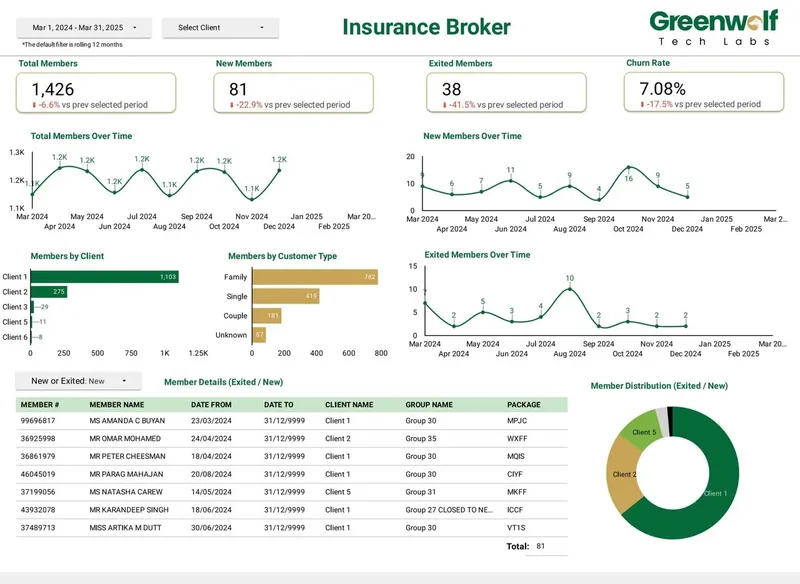
Everything is built in your Google Cloud project and your connector account, with the schedule, the re-load window and every view documented, so nothing depends on my login. Projects I've led at Greenwolf Tech Labs follow the same pattern: an Australian insurance brokerage's messy insurer files were automated into a central data source feeding the dashboard, and report time fell from 4-5 hours to under 5 minutes.
Case study · Insurance brokerage, Australia
From 4-5 hours of spreadsheet work to a report in under 5 minutes
A project I led at Greenwolf Tech Labs. Monthly reports were assembled by hand from inconsistent .xls files sent by several insurers. The files now land in Google Drive, are mapped into one central sheet with the business rules applied, and feed a Data Studio dashboard.
- Report time: 4-5 hours to under 5 minutes
- Reporting accuracy: about 75% to 99%
- Visibility across insurers: limited to real time, with filters
FAQ
Frequently asked questions
Can BigQuery Data Transfer Service import LinkedIn Ads?
No. As of November 2026 Google's list of supported transfer sources includes Facebook Ads, Google Ads, HubSpot, Klaviyo and Salesforce but not LinkedIn Ads. Use an ETL connector or your own script against the LinkedIn Marketing API.
Is there a free way to connect LinkedIn Ads to BigQuery?
Yes, with limits. Windsor.ai's forever free tier covers one data source and one account, Fivetran's free plan includes 500,000 monthly active rows, and Coupler.io's free plan allows one account with manual refresh. Manual CSV uploads from Campaign Manager are also free but need repeating by hand.
How far back can I load LinkedIn Ads data into BigQuery?
LinkedIn keeps account, campaign and creative performance for ten years and professional demographic data for two. Daily data is kept for six months, after which requests round to whole months. Backfill as early as possible and keep the history in BigQuery.
How often should LinkedIn Ads data refresh in BigQuery?
Daily is enough for most teams. Each run should reload the last 7 to 30 days because conversions and demographic metrics are revised after the fact, with demographics delayed 12 to 24 hours. Hourly refresh adds cost without much benefit.
Why are LinkedIn job title numbers in BigQuery lower than campaign totals?
LinkedIn drops demographic values with fewer than 3 events, returns only the top 100 values per creative per day, and approximates the figures for privacy. Demographic tables will always sum to less than campaign totals, so report them as shares, not as totals.
Do I need LinkedIn Advertising API access to build my own pipeline?
Yes. Your developer app must be approved for the Advertising API, and the authorising user needs a role on each ad account. LinkedIn's Development tier allows unlimited reading of data for ad accounts you administer, which is enough for a reporting pipeline.
Can I join LinkedIn Ads data to Salesforce or HubSpot in BigQuery?
Yes, and it is the most common reason to use BigQuery. Load the CRM into the same dataset, match on campaign IDs or UTM values captured on the lead, and build a view of spend against pipeline. Data Studio then reads that view.
Keep reading
Related pages
Get started
Tell me what the report has to answer
Send the question your team keeps asking and where the data lives today. I reply within one business day with how I would build it, which connectors it needs and what it would cost.
- Free 30-minute review of your data and reports
- A fixed price before any work starts
- Built in your Google account, so you own everything
Prefer email? harsh@greenwolftechlabs.com
Book a free review
Two lines is enough to start.