Connector guide
WooCommerce to Data Studio: how to connect your store, what it costs and how to make revenue match
Getting WooCommerce to Data Studio takes a partner connector, a direct MySQL connection to your store's database, a Google Sheets sync or a CSV export, because Google ships no native WooCommerce connector. This guide is for store owners and ecommerce managers who want orders, products and refunds in the same report as Google Ads, Meta and GA4. I compare the routes with prices checked in October 2026, explain when the MySQL route is worth the setup, and show why your Data Studio revenue rarely matches WooCommerce Analytics until a few settings are aligned.
Quick answer
How do I connect WooCommerce to Data Studio?
Data Studio has no native WooCommerce connector, so you use a partner connector such as Data Bloo, Windsor.ai or Coupler.io, which read the WooCommerce REST API with a read-only key, or Data Studio's native MySQL connector pointed at your store database. Connectors are quickest; MySQL or BigQuery gives control over refunds, statuses and history.
- Google has no native WooCommerce connector, so every route uses a partner tool or your database.
- Free options exist: Data Bloo and Windsor.ai both offer a free plan for one store.
- The native MySQL connector is free but caps queries at 150,000 rows and needs IP allowlisting.
- Revenue gaps with WooCommerce Analytics usually come from statuses, date type and refund timing.
Can you connect WooCommerce to Data Studio for free?
Yes, for a single store with modest reporting needs. Data Bloo offers a free forever plan for its WooCommerce connector covering 1 account and up to 300 daily refreshes, and Windsor.ai keeps a forever free plan for 1 user, 1 data source and 1 account. Data Studio's own MySQL connector is also free if your host lets an outside service reach the database.
What free does not buy you is control. A free connector decides which fields exist, how refunds appear and how far back history goes. Windsor.ai's free plan, for example, has no backfill syncs once the 30-day trial ends. That is fine for a live sales overview and limiting for a year-on-year report or a margin dashboard that needs product costs joined to order lines.
Data Studio itself adds nothing to the bill. Building and viewing reports is free, and Data Studio Pro, at $9 per user per project per month, is only needed for team workspaces, organization-owned content or alerts. People who only view the report never need a Pro licence or a WordPress login.
What are the ways to get WooCommerce data into Data Studio?
There are four practical routes. They differ in setup effort, how fresh the data is, and how much say you have over what one row means.
A partner connector appears in the Data Studio connector gallery and calls the WooCommerce REST API each time a chart refreshes. You generate a read-only key under WooCommerce, Settings, Advanced, REST API, and the vendor handles the rest. The direct database route uses Data Studio's native MySQL connector against the tables WooCommerce already keeps, ideally through a read replica. A Sheets sync, such as Coupler.io, writes orders into a Google Sheet on a schedule. A CSV route is a manual export from the Orders screen or WooCommerce Analytics, pasted into Sheets.
The vendor pages that rank for this search each describe their own tool. In practice the choice comes down to two questions: do you need history and refund logic you can audit, and does anyone on your side have database access? If both answers are no, use a connector. If either is yes, look hard at MySQL or a scheduled load into BigQuery.
| Route | Setup time | Freshness | Best for | Main drawback |
|---|---|---|---|---|
| Partner connector (REST API) | Under an hour | Per vendor plan, daily to 15 minutes | One or a few stores, standard sales reports | Vendor controls field layout and refund handling |
| MySQL connector to the store database | Half a day to two days | Live, or as fresh as the replica | Full order history, custom SQL, no monthly fee | Needs host access, IP allowlisting and SQL skills |
| Sheets sync (for example Coupler.io) | One to two hours | Scheduled, daily or hourly by plan | Small catalogs and a few thousand orders | Sheets slows as rows grow; row caps per run |
| Manual CSV export | Minutes per export | Only when someone exports | A one-off board pack | Stale immediately; versions drift apart |
How much does a WooCommerce connector for Data Studio cost?
For one store on a daily refresh, expect anything from free to about $32 a month. Hourly refresh and multiple stores cost several times more. I read the figures below on each vendor's own pricing page on October 29, 2026; connector prices change often, so check before you commit.
Two details matter more than the headline price. First, how the plan counts usage: Data Bloo meters API calls per day, Coupler.io meters rows per run, and Windsor.ai meters data sources and accounts. A store that also wants Google Ads and Meta in the same tool will use three Windsor.ai data sources, which is exactly the Basic plan's limit. Second, whether the vendor stores your data. Data Bloo states that it reads WooCommerce through the REST API with read-only access and does not store your data, which some finance teams will ask about.
| Option | Free tier | Paid entry price (October 2026) | Refresh on entry plan |
|---|---|---|---|
| Data Bloo | Free forever: 1 account, up to 300 daily refreshes | From $24.99 per month for up to 10 accounts | Higher refresh limits on paid plans |
| Windsor.ai | Forever free: 1 user, 1 data source, 1 account, no backfill | $23 per month, or $19 per month billed annually (Basic, 3 data sources) | Daily; hourly from Standard at $118 per month ($99 annually) |
| Coupler.io (Sheets or Data Studio) | $0: manual refresh, 100 rows per run | $32 per month, or $24 per month billed annually (Starter, 5,000 rows per run) | Daily; hourly from Pro at $259 per month ($199 annually) |
| Native MySQL connector | Free | Hosting cost of a read replica, if you add one | Live queries |
| Manual CSV to Sheets | Free | Staff time per export | Manual |
Should you connect Data Studio directly to the WooCommerce MySQL database?
Often yes, if your host allows remote connections and someone can write SQL. WooCommerce runs on MySQL, Data Studio has a native MySQL connector, and the data is already sitting there with full history. There is no monthly connector fee and no API call budget to watch.
The limits are specific, and Google's MySQL connector documentation lists them. Each query returns at most 150,000 rows before truncation. A custom query can contain only one statement and times out after three to five minutes. Column names must be ASCII. Supported versions are MySQL 5.6, 5.7, 8.0 and 9.0, and support for 5.6 and 5.7 ends after February 26, 2027, so stores on older managed hosting should check their version now. The database firewall must allow Google's ranges, 142.251.74.0/23 and 2001:4860:4807::/48, or 142.251.56.0/24 and 2001:4860:4815::/48 if you use Data Studio's data residency option. Use TLS and a read-only database user.
Know which tables you are reading. Since WooCommerce 8.2 in October 2023, new stores use High-Performance Order Storage by default, which keeps orders in their own tables (wc_orders, wc_order_addresses, wc_order_operational_data and wc_orders_meta, each with your table prefix) instead of the older WordPress posts and postmeta tables. Older stores may still use posts and postmeta, or run both with compatibility mode syncing them. A query written for one layout returns nothing useful on the other. WooCommerce Analytics also maintains its own summary table, wc_order_stats, which is usually the easiest starting point for revenue by day.
Here is how the row cap bites. Take a store with 40,000 orders a year and an average of 2.5 items per order. That is 100,000 order-line rows a year, so a chart reading raw order lines passes 150,000 rows within about 18 months. The fix is to aggregate in SQL first: one row per day, product and status, which stays in the low thousands. For longer history or joins with ad spend, a nightly copy into BigQuery is the more durable design.
Why doesn't WooCommerce revenue in Data Studio match WooCommerce Analytics?
Because the two reports usually count different orders, on different dates, with different definitions of sales. The connector is rarely broken. Align these settings first, then compare again.
A worked example shows how refund timing alone creates a gap. Say a customer pays $200 on September 28 and you refund $50 on October 3. WooCommerce Analytics books the refund as a negative return on October 3, so September keeps $200 of gross sales and October shows minus $50. A Data Studio chart summing order totals by order date shows September at $150 and October at zero, or September at $200 if the connector ignores refunds. All three views are defensible; only one matches the store's own screen. Choose the rule, write it on the report, and reconcile last month against WooCommerce Analytics before anyone else sees the dashboard.
- Excluded statuses: by default WooCommerce Analytics leaves out Pending payment, Cancelled and Failed orders, and includes Processing, On hold and Completed. Many connectors return every status, so filter on status in Data Studio.
- Date type: WooCommerce Analytics defaults to Date Paid. Orders without a paid date, such as some bank transfer or cash on delivery orders, do not appear. Most connectors and SQL queries use the created date.
- Sales definitions: Gross Sales excludes refunds, coupons, tax and shipping. Net Sales is Gross Sales minus returns minus coupons. Total Sales adds tax and shipping back. A connector field called revenue or total is usually closer to Total Sales.
- Refunds: WooCommerce stores each refund as its own record linked to the parent order, and Analytics shows it on the refund date. Refunded shipping and tax are reported in the shipping and tax figures, not in returns.
- Date range and time zone: WooCommerce Analytics opens on month to date by default. Set the same range in Data Studio, and check that the WordPress time zone and your data source agree on where a day starts.
- Custom statuses: plugins that add statuses such as Shipped or Awaiting pickup can drop orders out of one report and not the other.
What should a WooCommerce dashboard in Data Studio show?
Start from the three questions a store owner asks each week: are we selling more, which products and channels drive it, and where is money leaking. A first version fits on three pages.
Page one is sales: net sales, orders and average order value by day, month-on-month and quarter-on-quarter growth, and refunds as a separate line so they are visible rather than hidden in a net figure. Page two is products: units and net sales by product and category, refund rate by product, and items that stopped selling. Page three is acquisition: new versus returning customers, orders by coupon, and, from their own connectors, Google Ads and Meta spend beside WooCommerce revenue so cost per order is on screen.
Two Data Studio details help. A CASE statement in a calculated field can group raw statuses into the buckets your team uses, such as Paid, Refunded and Lost, so a new plugin status does not quietly change the totals. And when you combine store and ad data, remember that blends take up to 5 sources with equality joins only. Join on date and a cleaned campaign or UTM source, or do the join in BigQuery where it can be checked.
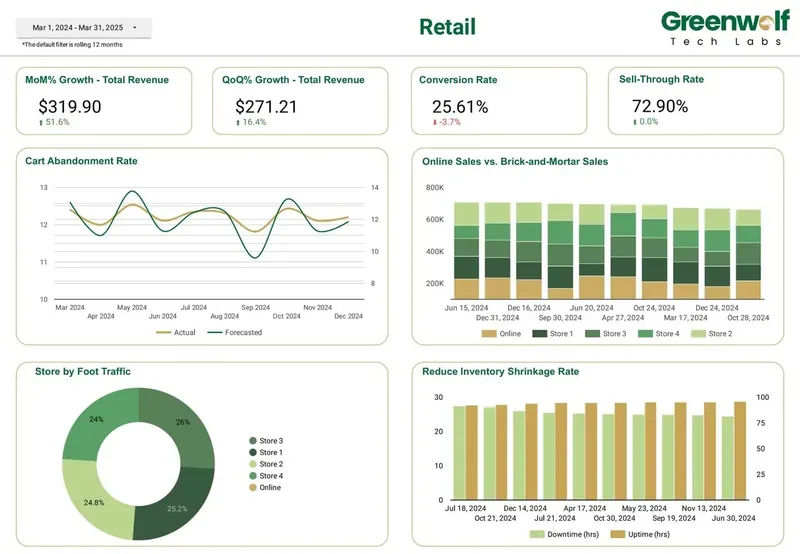
A retail dashboard I led at Greenwolf Tech Labs tracks MoM and QoQ revenue growth, conversion rate, sell-through rate, cart abandonment against forecast and online versus in-store sales. Those comparisons only hold up when every page uses the same status filter and the same date rule, which is why I agree both before the first chart.
How do you connect WooCommerce to Data Studio step by step?
The connection takes minutes. The steps around it decide whether the report still matches the store a year from now, and whether it survives the person who set it up leaving.
Ownership deserves one extra sentence. Data Studio data sources use the owner's credentials by default, and Data Studio gives no warning when a connector stops working. If the REST API key belongs to a former contractor's WordPress user, revoking that user breaks the dashboard on the same day.
- Write down the four or five numbers you review and the rule behind each, for example net sales by date paid, excluding Pending payment, Cancelled and Failed.
- Choose the route: a free connector for one store and a quick overview, a paid plan for several stores or hourly refresh, MySQL or BigQuery for history and margin.
- Create a dedicated WordPress user with the Shop Manager role, then generate a REST API key with Read permission only under WooCommerce, Settings, Advanced, REST API.
- For MySQL, create a read-only database user, allowlist Google's IP ranges, enable TLS, and confirm whether your store uses HPOS tables or posts and postmeta.
- Connect with a company Google account, not a personal one, and pull only the fields your charts use.
- Reconcile last month's net sales, order count and refunds against WooCommerce Analytics with matching status and date settings.
- Share the report rather than the data source, and schedule an email delivery before the weekly trading meeting.
When is WooCommerce to Data Studio not worth it?
If WooCommerce is your only data source and the people who need numbers already log into WordPress, WooCommerce Analytics may be enough. It covers revenue, orders, products, categories, coupons, taxes and stock out of the box, and it applies the store's own definitions.
Moving WooCommerce to Data Studio earns its keep when the report has to combine the store with ad spend, GA4 or finance data; when viewers such as investors or a finance lead should not have store admin access; when you run more than one store; or when you want product cost and margin that WooCommerce does not hold. A preference for different chart colors is not a reason to add a connector, a model and a monthly fee.
| Your situation | WooCommerce Analytics | Data Studio |
|---|---|---|
| One store, WooCommerce is the only source | Good fit | Optional |
| Ad spend, GA4 or finance data beside orders | Not designed for it | Good fit |
| Viewers without WordPress access | Needs a store login | Good fit with owner's credentials |
| Several stores in one view | One store per admin | Good fit with a multi-account connector or SQL |
| Margin using product costs | Not built in | Good fit with a cost sheet or table joined in |
How I handle WooCommerce reporting projects
Do it yourself if you have one store, standard statuses and a free connector that shows the fields you need. An afternoon is usually enough for a working sales overview.
Bring in help when revenue will not reconcile with WooCommerce Analytics, when you want refunds and margin handled properly, when you have several stores or currencies, or when the report has to outlive the person who built it. I start with a free review of your store setup, hosting, existing reports and the questions the dashboard must answer, then quote a fixed price. I build in your own Google and WooCommerce accounts, write down every status and date rule, reconcile against the store, and hand over documentation so your team can add pages later. Reports built under the Looker Studio name work the same way, since they moved to Data Studio automatically in April 2026.
FAQ
Frequently asked questions
Is there a native WooCommerce connector for Looker Studio?
No. Looker Studio is called Data Studio again, and its native connectors cover Google products and databases, not WooCommerce. Use a partner connector from the gallery, the native MySQL connector against your store database, a Google Sheets sync, or CSV exports.
Is there a free WooCommerce connector for Data Studio?
Yes. Data Bloo offers a free forever plan for 1 WooCommerce account with up to 300 daily refreshes, and Windsor.ai has a forever free plan for 1 user, 1 data source and 1 account. The native MySQL connector is also free if your host allows external connections.
Why is my WooCommerce revenue different in Data Studio?
The usual causes are different order statuses, a different date type (WooCommerce Analytics defaults to Date Paid), refunds counted on the order date instead of the refund date, and comparing a total that includes tax and shipping with Net Sales. Align those four and reconcile one month against WooCommerce Analytics.
Can Data Studio connect directly to the WooCommerce database?
Yes, through its native MySQL connector, provided your host allows remote connections from Google's IP ranges. Use a read-only user and TLS, and aggregate in SQL because each query returns at most 150,000 rows.
What permissions does a WooCommerce API key need for Data Studio?
Read only. Generate the key under WooCommerce, Settings, Advanced, REST API, attached to a dedicated Shop Manager user owned by the business. Avoid Read/Write keys for reporting, and never tie the key to a contractor's personal user.
Can I combine several WooCommerce stores in one Data Studio report?
Yes. Data Bloo and other connectors can aggregate several stores, and paid plans raise the account limit. With MySQL, query each store's database separately or load them into BigQuery with a store column, then report on the combined table.
Does the HPOS update affect my Data Studio report?
It affects reports that read the database directly. Since WooCommerce 8.2, new stores keep orders in dedicated HPOS tables rather than WordPress posts and postmeta, so SQL written for one layout fails on the other. Connectors that use the REST API are not affected.
Keep reading
Related pages
Get started
Tell me what the report has to answer
Send the question your team keeps asking and where the data lives today. I reply within one business day with how I would build it, which connectors it needs and what it would cost.
- Free 30-minute review of your data and reports
- A fixed price before any work starts
- Built in your Google account, so you own everything
Prefer email? harsh@greenwolftechlabs.com
Book a free review
Two lines is enough to start.