Connector guide
Google Business Profile to Data Studio: how to connect it, what the data means and how to report many locations
Getting Google Business Profile to Data Studio takes a partner connector, a Google Sheet, a BigQuery pipeline or a manual export, because Google ships no native Business Profile connector in Data Studio. This guide is for owners, marketing managers and local SEO leads who want calls, direction requests, website clicks and search terms for one or many locations in a report that stays right. I compare the routes, explain what Google's Business Profile Performance API actually returns, and cover the data limits that make most local dashboards quietly wrong.
Quick answer
How do I connect Google Business Profile to Data Studio?
Data Studio has no native Google Business Profile connector, so you use a partner connector from the gallery, a tool that writes Business Profile data into Google Sheets, a scheduled load into BigQuery through the Business Profile Performance API, or the Insights spreadsheet you download from Business Profile Manager. Partner connectors are fastest; BigQuery is the only route that keeps history beyond about 18 months.
- Google offers no native Business Profile connector in Data Studio, so every route uses a third party or a pipeline.
- Impressions count each user once per day, and search keywords come only as monthly totals.
- Performance data arrives 3 to 5 days late and only about 18 months is retrievable, so archive it.
- Multi-location reports break on profile access and naming far more often than on the connector.
Can you connect Google Business Profile to Data Studio for free?
Yes, with trade-offs. The free routes are the Insights spreadsheet Google lets you download from Business Profile Manager, a connector vendor's free tier for a small number of profiles, or your own script calling Google's free Business Profile Performance API. What you give up is history, the number of locations and the hours someone spends keeping it running.
Data Studio's native connectors cover Google Analytics 4, Google Ads, Search Console, Sheets, BigQuery, YouTube, Campaign Manager 360, Display and Video 360, Ad Manager and several SQL databases. Business Profile is a Google product, but it is not on that list, and the April 2026 rename from Looker Studio back to Data Studio did not change that. Coupler.io's own guide, dated July 6, 2026, states the same thing plainly: there is no built-in connector.
Several vendors, including Porter Metrics, Data Bloo and Windsor.ai, advertise free plans for Business Profile. Each caps something different, usually the number of profiles, the days of history or the refresh rate, and those terms change often. Read the limits on the vendor's pricing page before you build a client report on a free tier.
What are the four ways to get Business Profile data into Data Studio?
Each route trades setup speed against history, location count and control. The right one depends on how many profiles you manage, how far back you report, and whether Business Profile has to sit beside GA4, Google Ads or CRM data.
A partner connector appears in the Data Studio connector gallery and asks the vendor for data when a chart loads. A Sheets route writes daily metrics into a Google Sheet on a schedule, and Data Studio reads the sheet with its native connector. A BigQuery route calls the Performance API on a schedule, from a vendor or a small script, and appends each day to a table you own. The manual route is the multi-location Insights download from Business Profile Manager, pasted into a Sheet.
| Route | Setup effort | History you keep | Best for | Main drawback |
|---|---|---|---|---|
| Partner connector | Under an hour | Whatever the API returns now, about 18 months | One business or a few locations, standard metrics | Fee grows with locations; history disappears as it ages out of the API |
| Sheets via a sync tool | An hour or two | Grows over time if rows are appended, not replaced | Small portfolios, tight budgets | Sheets slows as rows multiply across many locations |
| BigQuery pipeline | A few days with modelling | Unlimited, once archived | Multi-location brands, franchises, joins to GA4 and calls data | Needs a Google Cloud project and someone to maintain the job |
| Manual Insights download | Minutes each month | Only what you saved | A one-off review or a quarterly owner report | Stale on save, and someone has to repeat it every month |
What data does the Business Profile Performance API return?
Daily counts per location for a fixed set of metrics, plus monthly search keyword impressions. That is all any connector can give you, because every vendor reads the same Google API. Knowing the list stops you promising a client a metric that does not exist.
Google replaced the old My Business v4 insights calls with the Business Profile Performance API. Its change log shows reportInsights replaced by locations.fetchMultiDailyMetricsTimeSeries, batch calls across many listings removed, and the API enabled per Google Cloud project. Reports built on old v4 connectors or scripts need rebuilding, not repairing.
The daily metrics in Google's current reference are listed below. Impressions are split by device and surface, and Google counts multiple impressions by one user in one day as a single impression, so they are closer to daily unique viewers than to page views.
- BUSINESS_IMPRESSIONS_DESKTOP_SEARCH and BUSINESS_IMPRESSIONS_MOBILE_SEARCH: profile views on Google Search.
- BUSINESS_IMPRESSIONS_DESKTOP_MAPS and BUSINESS_IMPRESSIONS_MOBILE_MAPS: profile views on Google Maps.
- CALL_CLICKS, WEBSITE_CLICKS and BUSINESS_DIRECTION_REQUESTS: the three actions most local reports are built on.
- MESSAGING_CLICKS: clicks on the message or chat button, added to the API on October 14, 2026.
- BUSINESS_BOOKINGS and BUSINESS_FOOD_MENU_CLICKS: only meaningful for businesses using Reserve with Google or menus.
- BUSINESS_CONVERSATIONS: deprecated in July 2024 after Google Business Messages shut down, and removed on January 31, 2026.
- BUSINESS_FOOD_ORDERS: deprecated on October 22, 2025, with removal scheduled for April 22, 2027 and no replacement.
Why are Google Business Profile numbers in Data Studio different from the profile?
Usually because of timing, counting rules or a deprecated field, not a broken connector. Check these in order before you blame the vendor or rebuild the report.
The fix for most of them is a short definitions note on the report itself: the date the data is complete to, what an impression means, and which metrics were retired. A client who reads that note stops filing tickets about yesterday's zero.
- Data delay: Funnel's documentation says Business Profile values typically take 3 to 4 days, and sometimes 5, to fill in. Set the default date range to end a week ago, or the last few days always look like a collapse.
- Unique counting: impressions and some actions count a user once per day, so summing a daily table over a month will not match a monthly total Google shows elsewhere.
- Search keywords are monthly only: the searchkeywords endpoint aggregates impressions by month, so a daily date control on that chart does nothing useful.
- Privacy thresholds: low-volume search terms return a threshold (the true value is below it) instead of a number. Treat them as 'under N', not zero, and never sum thresholds as if they were counts.
- Retired metrics: a report that still charts Conversations or food orders will show blanks or errors after removal dates.
- Location scope: a connector authorized by a user who can see 40 of 50 profiles reports 40 profiles, with no warning.
How far back can you report Google Business Profile data?
Roughly 18 months for daily performance data, and that window keeps moving. Funnel's documentation states that Performance Insights data is only available for the latest 18 months, and Google publishes no longer window for the Performance API. Anything older is gone unless someone saved it.
This is the strongest reason to land Business Profile data in BigQuery or an append-only Sheet rather than relying on a live connector. A live connector queries Google each time, so a year-on-year chart works today and loses its oldest months every day that passes. A scheduled job that appends each completed day to a date-partitioned BigQuery table keeps history permanently, costs little at the row counts Business Profile produces, and lets Data Studio read one clean table.
If you are starting today, begin archiving now even if the dashboard comes later. History you did not save cannot be bought back from any vendor.
How do you build a multi-location Google Business Profile dashboard?
Model one row per location per day, with a clean location table beside it, and build every chart on that. Multi-location reporting is where Business Profile reports most often go wrong, and the connector is rarely the cause.
Start with access. Put every profile into one Business Profile organization or location group, and connect with a company-owned account that has manager rights to all of them. A connector authorized through a staff member's personal login breaks the day they leave, and Data Studio gives no warning when a connector stops returning data.
Then build the location table: Google's location ID, store code, a clean display name, city, region, manager and whatever groupings the business uses (franchisee, brand, territory). Profile titles are written for customers, so names like 'Brand Coffee, Downtown' and 'Brand Coffee Downtown' will split one store into two rows if you group by title. Join on the location ID, never on the name.
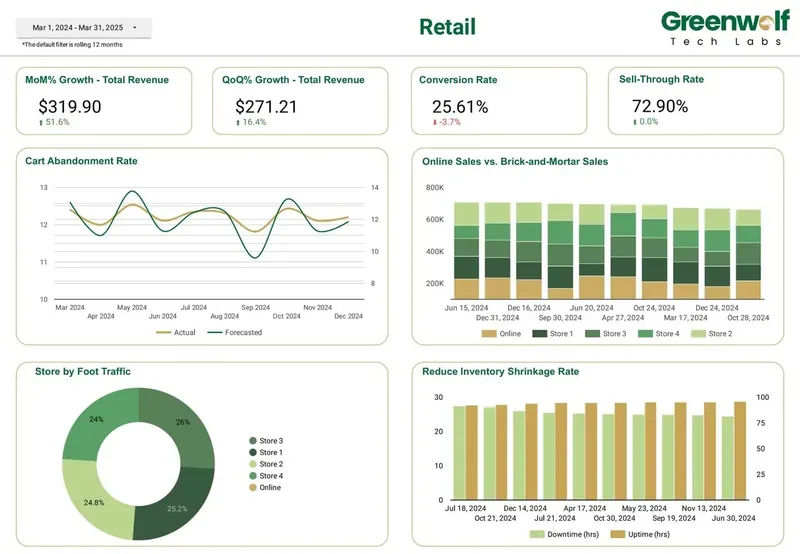
Finally, design the pages around decisions. Page one compares locations: calls, direction requests and website clicks per location this month against last month and last year, with a region filter. Page two is visibility: Search against Maps impressions by location, and the monthly search terms that bring people in. Page three is a single-location view a store manager can bookmark. Retail dashboards I've led at Greenwolf Tech Labs show online against in-store sales and store foot traffic, and Business Profile actions sit naturally beside numbers like those.
How do you connect Google Business Profile to Data Studio step by step?
The clicks take minutes. The steps that keep the report right next year are about ownership, scope and history, so they are included here.
Data sources in Data Studio run on the owner's credentials by default, so viewers see Business Profile data without needing profile access. That is useful for sharing with owners and store managers, and it is also why the owning account must belong to the company.
- List the questions: the five or six numbers the owner or regional manager reviews, and the definition of each, such as calls per location per month.
- Fix access first: one organization or location group, managed by a company account with rights to every profile you report.
- Choose the route: a partner connector for a quick single-business report, BigQuery for many locations or any year-on-year view, a Sheet for a small portfolio on a budget.
- Pull only what you need: the daily action and impression metrics, plus monthly search keywords, not every field the vendor offers.
- Add the location table and join on location ID, with store code and clean names.
- Set the default date range to end at least 5 days ago, and print 'data complete to' on the page.
- Reconcile one location for one complete month against the Performance view in Business Profile before anyone else sees the report.
- Share the report, not the data source, and schedule a monthly email delivery to each manager filtered to their locations.
Should Business Profile sit beside GA4, Ads and call tracking data?
Often yes, because a profile action is only the first step. Website clicks become GA4 sessions, call clicks become phone calls, and direction requests may become store visits. Showing them together answers the question owners actually ask: which locations turn visibility into customers.
Join on date and location, not on campaign. For a simple view, a Data Studio blend works, but blends allow at most 5 sources and equality joins only, so a location name spelled differently in GA4 drops rows without an error. For anything you rely on, map each source to the same location ID in BigQuery or a Sheet first. Tag the profile's website link with UTM parameters so GA4 can separate Business Profile visits from organic search, and remember GA4's own quota of 14,000 tokens per project per property per hour on busy multi-location pages.
When is Google Business Profile to Data Studio not worth it?
If you run one location and check it once a month, the Performance view inside Business Profile already shows calls, directions, website clicks and search terms. Moving the data out adds a connector, a definitions note and something to maintain, so only do it for a reason.
Good reasons: you manage many locations and need them ranked side by side; owners or franchisees need one shared view without profile access; you want history beyond 18 months; or Business Profile has to sit beside GA4, ads, calls or sales. Weak reasons: a nicer chart, or a report nobody will open after the first month.
Do it yourself if you have a handful of profiles and someone comfortable in Data Studio; a free connector tier and an afternoon is the right spend. Bring in help when you have dozens of locations, messy access, old v4 reports to replace, or a dashboard that must keep working after the person who built it moves on.
How I handle Google Business Profile reporting projects
I start with a free review of your profiles, how access is set up, and the questions the report must answer. I recommend the cheapest route that will hold up, which is often a connector you already pay for or a small archive job into your own BigQuery, and quote a fixed price for the build.
The work covers access cleanup, the location table, history archiving, the dashboard, reconciliation against Business Profile, and a handover note so your team can add locations without me. Everything lives in your Google accounts from day one, so nothing depends on my logins.
FAQ
Frequently asked questions
Does Data Studio have a native Google Business Profile connector?
No. Data Studio's native connectors cover GA4, Google Ads, Search Console, YouTube, Sheets, BigQuery and several SQL databases, but not Business Profile. You need a partner connector, a Sheets sync, a BigQuery pipeline or the Insights download from Business Profile Manager.
Is Google My Business the same as Google Business Profile in Data Studio?
Yes. Google renamed Google My Business to Google Business Profile, and many connectors still use the old name in the gallery. Both names point at the same profiles and the same Performance API data.
Why are the last few days empty in my Google Business Profile report?
Business Profile performance data arrives late. Funnel's documentation says values typically take 3 to 4 days, and sometimes 5, to fill in. End your default date range at least 5 days before today so recent days do not look like a drop.
Can I see Google Business Profile search keywords in Data Studio?
Yes, but only as monthly totals per location. Google's API returns search keyword impressions aggregated by month, and low-volume terms come back as a threshold rather than an exact number, so show them as 'below N' rather than zero.
How do I report on many Google Business Profile locations in one dashboard?
Connect with a company account that manages every profile, then build a location table keyed on Google's location ID with clean names, store codes and regions. Report from one row per location per day, and add a region or manager filter so each person sees their own stores.
Can I get more than 18 months of Google Business Profile history?
Not from Google after the fact. Daily performance data is only available for about the latest 18 months, so you need to archive it yourself, ideally by appending each completed day to a BigQuery table that Data Studio reads.
Do report viewers need access to the Business Profile?
No. With owner's credentials, the default for most data sources, viewers see the data through the owner's connection and only need access to the report. Make sure that owner is a company account, not a staff member's personal login.
Keep reading
Related pages
Get started
Tell me what the report has to answer
Send the question your team keeps asking and where the data lives today. I reply within one business day with how I would build it, which connectors it needs and what it would cost.
- Free 30-minute review of your data and reports
- A fixed price before any work starts
- Built in your Google account, so you own everything
Prefer email? harsh@greenwolftechlabs.com
Book a free review
Two lines is enough to start.