Connector guide
Klaviyo to Data Studio: how to connect it, what it costs and why the revenue never matches
Getting Klaviyo to Data Studio always runs through a partner connector, a Google Sheet, BigQuery or a CSV export, because Google ships no native Klaviyo connector. This guide is for ecommerce founders, email marketers and growth leads who want campaign and flow results beside Shopify, Google Ads, Meta and GA4 in one report. I compare the four routes with prices checked in October 2026, explain Google's new Klaviyo transfer into BigQuery, and show why Klaviyo revenue in your dashboard rarely matches the number in Klaviyo, and how to make it match.
Quick answer
How do I connect Klaviyo to Data Studio?
Data Studio has no native Klaviyo connector, so you use a partner connector such as Supermetrics, Windsor.ai or Porter Metrics, a tool that writes Klaviyo data into a Google Sheet, a scheduled load into BigQuery (Google's Klaviyo transfer is free while in Preview), or CSV exports. Use Klaviyo's Reporting API figures if the numbers must match the Klaviyo UI.
- Google offers no native Klaviyo connector, so every route uses a third party or a pipeline.
- Google's BigQuery Data Transfer Service now loads Klaviyo data, free while the connector is in Preview.
- Klaviyo books campaign revenue on the send date; most raw event tables book it on the order date.
- If email is your only channel and Klaviyo's dashboards answer your questions, skip Data Studio.
Can you connect Klaviyo to Data Studio for free?
Yes, with trade-offs. The free routes are a vendor's free plan for one account, Google's BigQuery transfer while it is in Preview, or CSV exports from Klaviyo pasted into a Google Sheet. What you give up is refresh frequency, history, the number of accounts, or someone's time every week.
Data Studio's native connectors cover Google products and a set of databases: GA4, Google Ads, Search Console, Sheets, BigQuery, YouTube, Campaign Manager 360, Display and Video 360, Ad Manager, Cloud SQL, MySQL, PostgreSQL, SQL Server and Redshift. Klaviyo is not on that list, and the April 2026 rename from Looker Studio back to Data Studio did not add it. Every Klaviyo route therefore goes through a partner connector or lands the data somewhere Data Studio already reads.
The free options I checked on the vendors' own pages in October 2026: Windsor.ai keeps a forever free plan limited to 1 user, 1 data source and 1 account, after a 30-day trial with a 30-day history limit. Coupler.io lists a free plan with 1 account, manual refresh and 100 rows per run, which is enough to test the fields but not to run a weekly report. Google's documentation states there is no cost to transfer Klaviyo data into BigQuery while the feature is in Preview, though BigQuery storage and queries are billed as usual once you pass the free tier.
What are the four ways to get Klaviyo data into Data Studio?
Each route trades setup speed against freshness, cost and control over how campaigns, flows and attributed revenue are defined. Pick based on how many Klaviyo accounts you run, how far back you report, and whether Klaviyo must sit beside Shopify orders and ad spend in the same table.
A partner connector sits in the Data Studio connector gallery and queries Klaviyo, or the vendor's copy of it, when a chart loads. A Sheets route writes Klaviyo results into a Google Sheet on a schedule, and Data Studio reads the sheet through the native Sheets connector. A BigQuery route loads Klaviyo objects into tables, with Google's own transfer service or an ETL vendor, and Data Studio reads modelled views on top. A CSV route means exporting campaign or flow results from Klaviyo by hand.
| Route | Setup effort | Freshness | Best for | Main drawback |
|---|---|---|---|---|
| Partner connector | Under an hour | Near live, within vendor caching | One brand, standard campaign and flow reports | Fees scale with accounts and sources; the vendor decides which revenue definition you get |
| Sheets route | An hour or two | Scheduled, daily on entry plans | Small lists, tight budgets, adding targets or notes beside results | Row limits per run and slow sheets once you store daily rows per flow message |
| BigQuery pipeline | Days, with modelling | Scheduled runs you choose | History, cohorts, joins to Shopify orders and ad spend | Needs a Google Cloud project and someone to write the SQL views |
| Manual CSV | Minutes each time | Only when someone exports | A one-off board pack or audit | Stale the moment it is saved; versions drift between people |
How much does a Klaviyo connector for Data Studio cost?
Entry prices run from free to about $32 a month, and costs climb with the number of accounts, sources and refresh frequency. The figures below come from each vendor's own pricing page, read in October 2026, and they are platform prices: the same plan covers Klaviyo plus your ad and analytics sources. Vendors change prices often, so confirm before you buy.
Supermetrics and Porter Metrics both market a Klaviyo connector for Data Studio. Supermetrics advertises a 14-day free trial on its Klaviyo page but does not quote a price there, and I could not read a current price from Porter Metrics' pricing page, so I have left both out of the table rather than guess. Price the plan you will need in six months, not the entry tier: count your Klaviyo accounts, the ad platforms that belong in the same report, and how fresh the numbers must be. A team that reviews email every Monday does not need an hourly refresh.
| Option | Free option | Paid pricing (October 2026) | What you get |
|---|---|---|---|
| Google BigQuery Data Transfer Service | Free transfers while in Preview | Not yet announced | 21 Klaviyo objects, including Campaigns, CampaignMessages, Flows, Events, Metrics, Profiles, Lists and Segments, in your own BigQuery dataset |
| Windsor.ai | Forever free: 1 user, 1 source, 1 account | Basic $23 per month, or $19 billed annually (3 sources, daily sync); Standard $118, or $99 billed annually (7 sources, daily or hourly sync) | Partner connector straight into Data Studio, plus other ad and analytics sources |
| Coupler.io | Free plan: 1 account, manual refresh, 100 rows per run | Starter $32 per month, or $24 billed annually (3 accounts, daily refresh, 5,000 rows per run); Active $132, or $99 billed annually | Klaviyo data written to Sheets, BigQuery or Data Studio on a schedule |
| Klaviyo Advanced KDP | None | Paid Klaviyo add-on, priced by Klaviyo | Klaviyo's own syncing of profile and event data with warehouses including BigQuery; confirm which direction and objects your plan covers with Klaviyo |
What is Google's Klaviyo transfer to BigQuery, and should you use it?
It is a Klaviyo connector inside BigQuery Data Transfer Service that loads your account's data into BigQuery on a schedule, at no transfer cost while it remains in Preview. For a brand that already has a Google Cloud project, or already uses Google's Shopify transfer, it is now the cheapest way to get Klaviyo history into a warehouse Data Studio reads natively.
According to Google Cloud's documentation (last updated October 22, 2026), the transfer needs a read-only private API key from Klaviyo and the BigQuery Admin role on your project. You choose the objects to load, such as Campaigns, Flows, Events and Profiles, and run it on a schedule, a custom interval or on demand, with backfill runs for history. Full transfers reload everything each run; incremental transfers, themselves in Preview, append or upsert only changed rows using a timestamp watermark. Two limits matter: incremental transfers cannot sync deletions, and you cannot change the selected objects or write mode after the first run. Preview features fall under Google's Pre-GA Offerings Terms, with support through a preview mailbox rather than standard Cloud support.
My view: use it for new builds where you want history, cohorts and joins with Shopify orders and ad spend, but treat it as Preview. Create the API key from an account the business controls, read-only, and label it so nobody deletes it in a tidy-up. Check the transfer run history for the first few weeks, never point a board report at raw tables, and build a modelled view on top. If Google changes the schema when the connector leaves Preview, you fix one view, not every chart.
One caution: this transfer loads objects and raw events. It does not load Klaviyo's Reporting API results, so revenue you rebuild from the Events table will follow event dates, not Klaviyo's send-date reporting. The next section explains why that matters.
Why doesn't Klaviyo revenue in Data Studio match Klaviyo?
Usually because the two are counting on different dates or with different rules, not because the connector is broken. Klaviyo's developer documentation says its Reporting API calculates campaign and flow performance by send date, the date the message went out, and is built to return 1:1 matches of the figures in the Klaviyo UI. Its Query Metric Aggregates endpoint and raw Events group results by when the event happened. Klaviyo's own integration guide says a "why don't these match" support ticket almost always traces back to mixing the two.
Attribution windows add a second layer. Klaviyo's Help Center lists the defaults for new accounts as 5 days for email clicks and 5 days for email opens, and 5 days for SMS clicks, with revenue credited to the last message the customer interacted with inside an open window. Windows can be set up to 90 days. When you change them, Klaviyo applies the change retroactively, and it can take up to 36 hours to reach historical data, so a report pulled during that period can disagree with itself.
A worked example shows the effect. A campaign is sent on September 30. A subscriber clicks on October 2 and places a $120 order on October 4. Klaviyo's campaign report, and any connector built on the Reporting API, puts that $120 against the September 30 send, so it lands in September. A table rebuilt from Placed Order events puts it on October 4, in October. Both are correct; they answer different questions. If you shorten the email click window to 1 day, the order is no longer attributed at all, because it came two days after the click.
Work through these causes in order before blaming the vendor.
- Send date vs event date: Reporting API figures follow the send; Events and metric aggregates follow the order.
- Conversion metric: Reporting API calls need a conversion metric ID, so one connector may use Placed Order and another a different metric.
- Attribution window changes: a changed window rewrites history, so compare figures pulled after the change has fully applied.
- Opens: open-based attribution only uses opens Klaviyo records, and accounts can exclude Apple Mail Privacy Protection opens from attribution.
- Refunds and cancellations: attributed revenue is built from order events, so it will not equal Shopify net sales after returns.
- Klaviyo vs GA4: GA4 credits revenue with its own sessions and attribution settings, so its email revenue will differ from Klaviyo's by design.
Do Klaviyo API limits affect a Data Studio report?
They can, with live connectors on busy reports. Klaviyo's Reporting API is tightly rate-limited: its developer reference lists the Query Flow Values endpoint at 1 request per second in bursts, 2 per minute steady, and 225 per day, and each request covers a timeframe of at most one year. Klaviyo's own guidance is to pull reporting endpoints a few times a day at most and cache the results.
That is why a dashboard with a dozen Klaviyo charts, a date control and several viewers can return errors or empty tables while Klaviyo itself is fine. A Sheets or BigQuery route avoids the problem, because Data Studio reads the stored copy, not Klaviyo. If you stay on a live connector, raise the data freshness interval on the data source, remove duplicate charts that ask for the same fields, and split year-over-year comparisons into two date ranges rather than one long one.
If GA4 sits on the same dashboard, it has its own quota of 14,000 tokens per project per property per hour, and quota errors there are often mistaken for a Klaviyo problem. Check which chart failed before changing anything.
What should a Klaviyo dashboard in Data Studio include?
Build it around the decisions you make each week: are emails and SMS driving revenue at the expected rate, which flows need work, and is the list growing with people who buy. A good first version fits on three pages.
Page one is channel performance: attributed revenue, revenue per recipient, orders and the share of total store revenue that email and SMS drive, by week, against last year and target. The total store revenue comes from Shopify, not Klaviyo, and that ratio is the single most useful number for a founder. Page two is campaigns and flows: open, click, conversion and unsubscribe rates by campaign, and revenue by flow and flow message, so a weak step in a welcome or abandoned-cart flow stands out. Page three is the audience: list and segment growth, form submit rates, and unsubscribes and spam complaints over time.
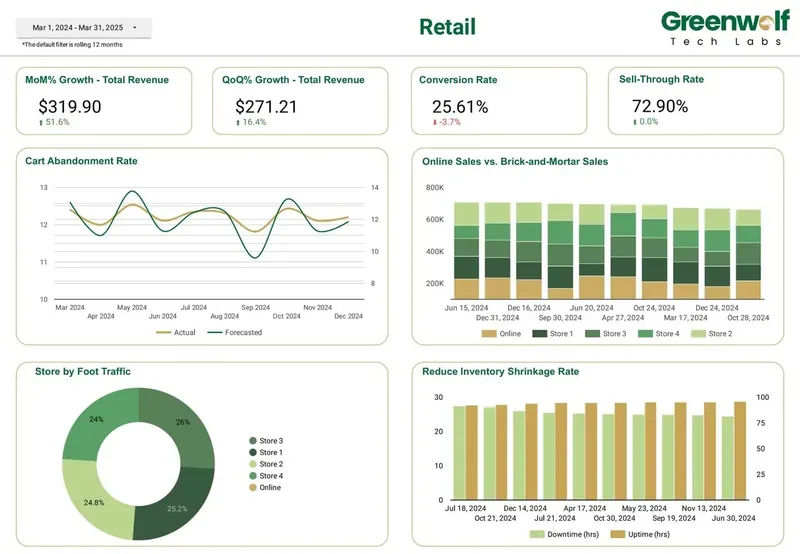
Use a calculated field with a CASE statement to group campaign names into the themes your team uses, such as launches, promotions and content, and a date range control that defaults to the last complete week. Label every revenue scorecard with its definition, for example Klaviyo attributed revenue by send date. Blends are limited to 5 sources and equality joins only, so for email revenue as a share of Shopify sales, build one table by date in BigQuery or a Sheet rather than stacking blends. Projects I've led at Greenwolf Tech Labs include a retail dashboard covering MoM and QoQ revenue growth, conversion rate, cart abandonment against forecast, and online versus in-store sales.
How do you connect Klaviyo to Data Studio step by step?
The clicks take minutes. The steps that prevent trouble later are about ownership, definitions and testing, so they are included here.
Data Studio data sources run on the owner's credentials by default, so viewers see Klaviyo results without a Klaviyo login. That is useful, but if the connection belongs to a contractor or someone who leaves, every chart breaks when their access goes, and Data Studio gives no warning when a connector stops working.
- Agree the numbers: list the five or six figures leadership reviews and define each, for example attributed revenue by send date using Placed Order.
- Choose the route: a partner connector for one brand and quick wins, BigQuery for history and Shopify joins, Sheets for a small list on a budget.
- Create a read-only private API key from a business-owned Klaviyo login, never a personal or freelancer account.
- Pull only what you need: campaign and flow results, lists and segments, and Placed Order events, not every object.
- Keep send-date and event-date revenue in separate, clearly named fields so nobody adds them together.
- Reconcile: compare last month's campaign revenue and recipients against Klaviyo's campaign report for the same dates and conversion metric.
- Share the report, not the data source, and schedule an email delivery for the weekly marketing meeting.
When is Klaviyo to Data Studio not worth it?
If email and SMS are your main channels and the team already works in Klaviyo's own reports, those may be enough. Moving data out adds a connector, a data model and something to maintain, so do it for a reason.
Good reasons: you need Klaviyo beside Shopify, Google Ads, Meta or GA4 in one place; leadership should see results without Klaviyo logins; you run several brands or accounts and want one view; or you need history beyond a year and cohorts Klaviyo reports do not give you the way you want. Weak reasons: a nicer chart style, or rebuilding a Klaviyo report that already works.
Do it yourself if you have one account, a free or entry connector and someone comfortable in Data Studio; an afternoon is the right spend. Bring in help when revenue does not match Klaviyo, when several accounts or currencies are involved, or when the report must keep working after the person who built it moves on.
How I handle Klaviyo to Data Studio projects
I start with a free review of your Klaviyo account setup, the questions the report must answer and any dashboards you already have. I recommend the cheapest route that will hold up, often a connector you already pay for or Google's BigQuery transfer, and quote a fixed price for the build.
The work covers the data model (campaigns, flows, attributed revenue by send date, orders by event date and the join to Shopify), the dashboard, reconciliation against Klaviyo's own campaign and flow reports, and a handover so your team can add fields and pages without me. Everything lives in your Google and Klaviyo accounts from day one, so nothing depends on my logins.
FAQ
Frequently asked questions
Does Data Studio have a native Klaviyo connector?
No. Data Studio's native connectors cover Google products such as GA4, Google Ads and Search Console, plus Sheets, BigQuery and several SQL databases. Klaviyo data needs a partner connector, a Sheets route, a BigQuery pipeline or CSV exports.
Is there a free Klaviyo connector for Looker Studio?
Looker Studio is now called Data Studio again, and free routes still exist. Windsor.ai's forever free plan covers 1 data source and 1 account, Coupler.io's free plan allows manual refreshes of 100 rows, and Google's BigQuery Klaviyo transfer is free while in Preview. BigQuery storage and queries are billed separately once you pass the free tier.
Why is Klaviyo revenue in my dashboard different from Klaviyo?
Usually because of dates and definitions. Klaviyo's reports book campaign and flow revenue on the send date, while raw events and many connector tables book it on the order date. Check the conversion metric, the attribution window and whether the window was changed recently, then reconcile against Klaviyo's report for the same dates.
Can I combine Klaviyo with Shopify and Google Ads in one report?
Yes. For simple views, blend on date, keeping in mind blends hold up to 5 sources and use equality joins only. For email revenue as a share of store sales, load Klaviyo and Shopify into BigQuery or a Sheet with matching date columns and report from that table.
How often does Klaviyo data refresh in Data Studio?
It depends on the route. Partner connectors query near live within the vendor's caching, Sheets tools and BigQuery transfers run on the schedule you set, and CSV exports refresh only when someone exports again. Klaviyo itself advises pulling its reporting endpoints a few times a day at most, so hourly is rarely worth paying for.
Should I use GA4 or Klaviyo for email revenue in Data Studio?
Use Klaviyo for campaign and flow performance, because its attribution is built for messages. Use GA4 for site behaviour and cross-channel comparisons, and expect its email revenue to differ from Klaviyo's because it uses its own sessions and attribution settings. Use Shopify for total store revenue.
Can one Data Studio report cover several Klaviyo accounts?
Yes. Most connectors let you add several accounts, usually on paid tiers. For clean totals across brands, load each account into BigQuery with an account column, convert currencies in a view if needed, and point the report at that view.
Keep reading
Related pages
Get started
Tell me what the report has to answer
Send the question your team keeps asking and where the data lives today. I reply within one business day with how I would build it, which connectors it needs and what it would cost.
- Free 30-minute review of your data and reports
- A fixed price before any work starts
- Built in your Google account, so you own everything
Prefer email? harsh@greenwolftechlabs.com
Book a free review
Two lines is enough to start.