Connector guide
QuickBooks to Data Studio: how to connect your books, what it costs and why the P&L never matches
Moving QuickBooks to Data Studio always runs through a partner connector, a Google Sheet, a warehouse such as BigQuery, or exported reports, because Google ships no native QuickBooks connector. This guide is for founders, finance managers and analysts who want revenue, expenses, receivables and cash beside sales and marketing data in one report. I compare the four routes with prices checked in October 2026, explain what Intuit's 2025 API fees and limits mean for your setup, and show why a Data Studio P&L rarely matches the one in QuickBooks, and how to fix it.

Quick answer
How do I connect QuickBooks to Data Studio?
Data Studio has no native QuickBooks connector, so you use a partner connector from the connector gallery, a tool that writes QuickBooks data into a Google Sheet, a scheduled load into BigQuery, or exported reports. Connectors are fastest for one company; a warehouse is best for history, several entities and joining finance to CRM or ad data.
- Google offers no native QuickBooks connector, so every route uses a third party or a pipeline.
- Most P&L mismatches come from cash versus accrual basis and dates, not a broken connector.
- Intuit now meters read API calls for app partners, which shapes connector pricing and DIY builds.
- If QuickBooks reports already answer your questions and nothing else joins them, skip Data Studio.
Can you connect QuickBooks to Data Studio for free?
Yes, for a single company with modest needs. The free routes are a vendor's free plan, a QuickBooks report exported to a Google Sheet by hand, or a small script of your own. What you give up is refresh frequency, row volume, history or someone's time every month-end.
Data Studio's native connectors cover Google products and a set of databases: GA4, Google Ads, Search Console, Sheets, BigQuery, YouTube, Campaign Manager 360, Display and Video 360, Ad Manager, Cloud SQL, MySQL, PostgreSQL, SQL Server and Redshift. QuickBooks is not on that list, and the April 2026 rename from Looker Studio back to Data Studio did not add it. So QuickBooks data reaches a report either through a partner connector or by landing somewhere Data Studio already reads.
The free plans I checked on vendors' own pricing pages in October 2026: Windsor.ai keeps a forever free plan of 1 user, 1 data source and 1 account after a 30-day trial that carries a 30-day history limit. Coupler.io lists a free plan of 1 account, 1 destination, manual refresh and 100 rows per run, which is enough to test a template but not to run a monthly P&L with transaction detail.
What are the four ways to get QuickBooks data into Data Studio?
Each route trades setup speed against freshness, cost and control over how accounts, classes and transactions are modelled. Choose based on how many companies you report on, how far back you need to go, and whether finance must sit beside CRM, ecommerce or ad data in the same table.
A partner connector sits in the Data Studio connector gallery and queries QuickBooks, or the vendor's copy of it, when a chart loads. Jivrus, for example, lists a QuickBooks connector in the gallery that exposes both QuickBooks objects and pre-built QuickBooks reports. A Sheets route writes QuickBooks records or reports into a Google Sheet on a schedule, and Data Studio reads the sheet through the native Sheets connector. A warehouse route replicates QuickBooks objects into BigQuery or another database Data Studio reads, which is the approach Skyvia and Windsor.ai both describe. A manual route means running a report in QuickBooks, exporting it and pasting it into a sheet.
| Route | Setup effort | Freshness | Best for | Main drawback |
|---|---|---|---|---|
| Partner connector | Under an hour | Near live, within vendor caching | One company, standard P&L, AR and AP views | The vendor decides how reports and line items are flattened; fees rise with companies |
| Sheets route | An hour or two | Scheduled, daily on entry plans, hourly or faster on higher tiers | Small businesses, custom columns, quick budget-vs-actual sheets | Sheets slows as transaction rows grow, and an edited tab can break the report |
| Warehouse (BigQuery) | Days, with modelling | Hourly to daily schedules | Several entities, multi-year history, joins to CRM, Shopify or ads | Needs a Google Cloud project and someone to write and maintain SQL views |
| Manual export | Minutes each time | Only when someone exports | A one-off board pack or audit | Stale the moment it is saved, and versions drift between people |
How much does a QuickBooks connector for Data Studio cost?
Entry prices run from free to about $32 a month, and the bill climbs with the number of companies, other sources in the same plan and refresh frequency. The figures below come from each vendor's pricing page, read in October 2026. Vendors change prices often, so confirm before you buy.
Several vendors that rank for QuickBooks and Data Studio, including Improvado, Skyvia and Jivrus, do not show a QuickBooks-specific price on the pages I read; Skyvia describes usage-based pricing with a free tier. Price the plan you will need in a year, not the entry tier. Count the QuickBooks companies, every other source that belongs in the same report, and how fresh the numbers must be. A finance team that closes monthly and reviews weekly does not need a 15-minute refresh.
| Option | Free option | Paid pricing (October 2026) | What you get |
|---|---|---|---|
| Windsor.ai | Forever free: 1 user, 1 source, 1 account | Basic $23 per month, or $19 billed annually; Standard $118, or $99 billed annually | Partner connector straight into Data Studio, plus ad, CRM and analytics sources on the same plan |
| Coupler.io | Free: 1 account, manual refresh, 100 rows per run | Starter $32 per month, or $24 billed annually (3 accounts, daily refresh, 5,000 rows per run); Active $132, or $99 billed annually (15 accounts, unlimited volume); Pro $259, or $199 billed annually (hourly refresh) | QuickBooks objects and reports written to Sheets, BigQuery or Data Studio on a schedule, with finance dashboard templates |
| Your own script or custom connector | Intuit's free Builder tier covers 500,000 read credits a month | Your build and maintenance time | Exactly the reports and fields you choose, owned by you |
What do Intuit's 2025 API fees and limits mean for your report?
Reading data out of QuickBooks Online is no longer free for app developers at scale, and the API has hard limits that a busy live report can hit. Neither should stop a small business, but both explain why connector prices and refresh options look the way they do.
Intuit launched its App Partner Program for US partners on July 28, 2025, with a fee-free transition until October 31, 2025 and full fees from November 1, 2025, according to Apideck's September 2025 summary. Writing data to QuickBooks stays free. Reading it, which Intuit calls CorePlus API calls, is metered: the free Builder tier includes 500,000 credits a month, Silver is $300 a month for 1 million, Gold is $1,700 a month, and Platinum is $4,500 a month for up to 75 million. Connector vendors absorb these fees across their customers. A business writing its own script for one company will usually stay well inside the Builder tier, provided it pulls on a schedule rather than every time someone opens the report. The program covers QuickBooks Online only, not QuickBooks Desktop.
The throttles matter more day to day. Coefficient's August 2025 summary of Intuit's documentation lists 500 requests per minute per company (realm ID), a maximum of 10 simultaneous requests per company per app, 40 batch requests per minute, and responses for the Balance Sheet, Transaction List and Journal reports capped at 400,000 cells. Go over the request limits and the API returns HTTP 429 Too Many Requests. In practice, a multi-year general ledger pulled as one Transaction List report is the pattern that hits the cell cap. Pull it month by month into a table instead, and let Data Studio read the table.
Does QuickBooks Desktop work with Data Studio?
Not through the cloud connectors described above. The vendor pages I read for this guide describe QuickBooks Online connections, and Intuit's App Partner Program and its API limits apply to QuickBooks Online. Desktop files live on a machine or a hosted server, not behind the Online API.
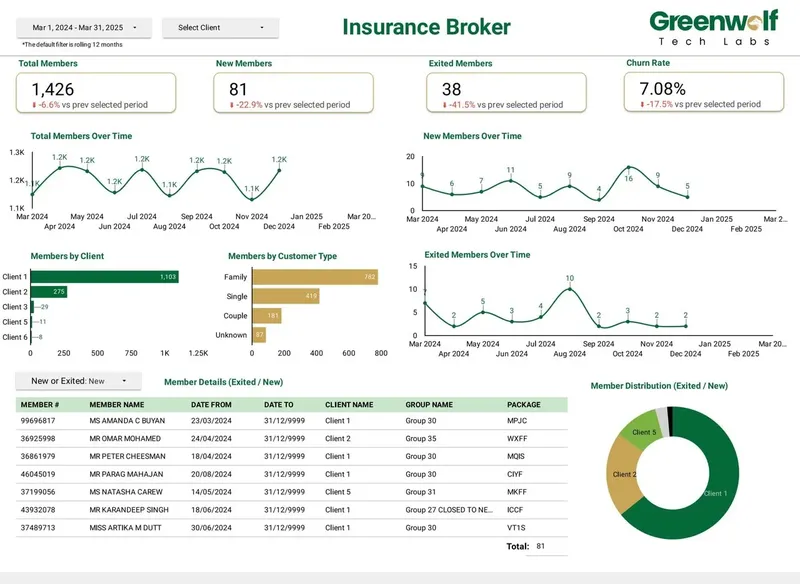
For Desktop, the workable routes are scheduled report exports into a Google Drive folder that a script maps into a Sheet or BigQuery, or a Desktop-specific sync tool that writes to a database. The pattern is the same one I have used for messy file-based sources: on a project I led at Greenwolf Tech Labs for an Australian insurance brokerage, insurer .xls files landed in Google Drive, were mapped into a central Google Sheet with business rules applied, and fed the dashboard. Report time fell from 4-5 hours to under 5 minutes and accuracy rose from about 75% to 99%. If you are planning a move to QuickBooks Online anyway, build the reporting after the move, not before.
Why doesn't the P&L in Data Studio match QuickBooks?
Usually because the two are built on different rules, not because the connector lost data. QuickBooks' Profit and Loss report applies an accounting basis, a report period and account groupings at the moment you run it. A connector table of raw invoices, bills and payments applies none of that until you model it.
A worked example shows the biggest cause. Say you invoice a client $10,000 on September 29 and they pay on October 6. On an accrual-basis P&L, September shows $10,000 of income and October shows nothing. On a cash-basis P&L, September shows nothing and October shows $10,000. A Data Studio chart built on an Invoice table by transaction date agrees with accrual; one built on a Payment table agrees with cash. Both are correct. Decide which basis each page of the dashboard uses, label it in the header, and reconcile against the QuickBooks report run on the same basis. QuickBooks' report API takes the accounting method as a parameter, so a connector pulling the P&L report rather than raw transactions should let you set it.
Work through these causes in order before blaming the vendor.
- Accounting basis: cash versus accrual moves income and expenses between months, as in the example above.
- Report snapshot versus live data: a P&L pulled in early October will not include a September bill entered on October 12. Backdated entries change closed months.
- Account mapping: QuickBooks groups accounts into income, cost of goods sold and expenses. Summing transactions without the account type mixes them, and sub-accounts can double count.
- Signs: when income and expense lines both arrive as positive amounts in one column, a single SUM adds them instead of netting them. Flip expense signs in a calculated field.
- Classes and locations: filtering one class in Data Studio excludes transactions with no class, which QuickBooks shows as Not specified.
- Fiscal year: Data Studio's date ranges follow the calendar unless you add a fiscal period field; year-to-date will differ if your year starts in April or July.
- Multi-currency: report in the home currency field, not the transaction currency, or foreign invoices inflate totals.
- Deleted and voided transactions: some replication tools keep the old row unless deletes are synced, so voided invoices linger.
What should a QuickBooks dashboard in Data Studio include?
Build it around the questions a finance lead or founder asks each week: are we profitable this month, who owes us money, what do we owe, and how much cash will we have. A good first version fits on four pages.
Page one is the P&L: income, cost of goods sold, gross margin, operating expenses and net profit by month, against last year and budget, with the basis stated. Page two is receivables: open and overdue invoices, an aging table in 0-30, 31-60, 61-90 and 90+ day buckets, and top customers by balance. Page three is payables: bills due in the next 30 days and spend by vendor and category. Page four is cash: bank balances over time and cash in versus cash out.
Use a calculated field with a CASE statement to map your chart of accounts into the eight to ten lines management reads, and a parameter for the budget scenario if you keep more than one. Set data source credentials to the owner's, so a sales manager can see revenue without a QuickBooks login, and restrict which pages each group sees. Blends are limited to 5 sources and equality joins only, so for revenue per customer across QuickBooks and HubSpot or Shopify, build one table keyed on customer and month in a Sheet or BigQuery rather than stacking blends. CFO and finance dashboards from projects I've led at Greenwolf Tech Labs follow the same idea: cash, revenue, spend and margin in one view for finance leaders.
How do you connect QuickBooks to Data Studio step by step?
The clicks take minutes. The steps that keep the numbers trusted after month-end are about access, definitions and reconciliation, so they are included here.
Data Studio gives no warning when a connector stops working. If the QuickBooks authorization belongs to a bookkeeper or contractor who later loses access, every chart goes blank without an alert, so connect from an admin login the business controls and check the report after each close.
- Agree the numbers: list the figures leadership reviews and define each, for example net profit, accrual basis, by month, in home currency.
- Choose the route: a partner connector for one company, a Sheet for budget-vs-actual work, BigQuery for several entities or joins with other systems.
- Authorize from a business-owned QuickBooks admin login, never a personal or freelancer account.
- Pull reports for summaries and transactions for drill-downs: the P&L and Balance Sheet reports by month, plus invoices, bills and payments.
- Map the chart of accounts to reporting lines in one place, a lookup sheet or a SQL view, not in each chart.
- Reconcile: compare last month's income, expenses and net profit against QuickBooks with the same basis, period and class filters, to the cent.
- Share the report, not the data source, and schedule an email delivery for the day after each close.
When is QuickBooks to Data Studio not worth it?
If QuickBooks is your only source and the people who need the numbers already have QuickBooks access, its built-in reports and management reports may be enough. Moving data out adds a connector, a mapping and something to maintain every time the chart of accounts changes.
Good reasons to do it: finance needs to sit beside sales, ecommerce or marketing data; people who need the numbers should not have QuickBooks access; you report on several companies or classes in one view; or the board wants trends and history in a layout QuickBooks does not give. Weak reasons: a nicer chart style, or rebuilding a QuickBooks report that already works.
Do it yourself if you have one company, a free or entry connector and someone comfortable with calculated fields; an afternoon is the right spend. Bring in help when totals do not tie to QuickBooks, when several entities or currencies are involved, or when the report must survive a change of bookkeeper.
How I handle QuickBooks to Data Studio projects
I start with a free review of your QuickBooks setup, the questions the report must answer and any spreadsheets you use today. I recommend the cheapest route that will hold up, often a connector you already pay for or a Sheet, and quote a fixed price for the build.
The work covers the chart-of-accounts mapping, the accounting basis, classes and currencies, the dashboard itself, reconciliation against QuickBooks to the cent for a recent closed month, and a handover so your team can add accounts and pages without me. Everything lives in your Google and QuickBooks accounts from day one, so nothing depends on my logins.
Case study · Insurance brokerage, Australia
From 4-5 hours of spreadsheet work to a report in under 5 minutes
A project I led at Greenwolf Tech Labs. Monthly reports were assembled by hand from inconsistent .xls files sent by several insurers. The files now land in Google Drive, are mapped into one central sheet with the business rules applied, and feed a Data Studio dashboard.
- Report time: 4-5 hours to under 5 minutes
- Reporting accuracy: about 75% to 99%
- Visibility across insurers: limited to real time, with filters
FAQ
Frequently asked questions
Does Data Studio have a native QuickBooks connector?
No. Data Studio's native connectors cover Google products such as GA4, Google Ads and Search Console, plus Sheets, BigQuery and several SQL databases. QuickBooks data needs a partner connector, a Sheets route, a warehouse pipeline or exported reports.
Is there a free QuickBooks connector for Looker Studio?
Looker Studio is now called Data Studio again, and free options still exist. Windsor.ai's forever free plan covers 1 data source and 1 account, and Coupler.io's free plan allows 1 account with manual refresh and 100 rows per run. Both suit testing more than a full monthly P&L.
Why is my QuickBooks profit in Data Studio different from QuickBooks?
Usually because of accounting basis, dates or account mapping. Check whether the dashboard uses cash or accrual, whether entries were backdated after the data was pulled, and whether transactions are grouped by account type. Then reconcile against the QuickBooks P&L run on the same basis and period.
Can I connect QuickBooks Desktop to Data Studio?
Not through the QuickBooks Online connectors most vendors sell. Desktop data usually reaches Data Studio through scheduled report exports into Google Drive that a script maps into a Sheet or BigQuery, or through a Desktop-specific sync tool that writes to a database.
How often does QuickBooks data refresh in Data Studio?
It depends on the route. Partner connectors query near live within the vendor's caching, Sheets and warehouse tools run on the schedule your plan allows (daily on entry tiers, hourly or faster on higher ones), and manual exports refresh only when someone exports again.
Can I combine QuickBooks with HubSpot, Shopify or ad data in one report?
Yes. For simple views, blend on month, keeping in mind blends hold up to 5 sources and use equality joins only. For revenue per customer or cost per acquired customer, load each source into a Sheet or BigQuery with matching customer and month columns and report from that table.
Do QuickBooks API limits affect a Data Studio dashboard?
They can on large files. QuickBooks Online allows about 500 requests per minute per company and caps Balance Sheet, Transaction List and Journal report responses at 400,000 cells. Pulling history month by month into a stored table avoids both limits.
Keep reading
Related pages
Get started
Tell me what the report has to answer
Send the question your team keeps asking and where the data lives today. I reply within one business day with how I would build it, which connectors it needs and what it would cost.
- Free 30-minute review of your data and reports
- A fixed price before any work starts
- Built in your Google account, so you own everything
Prefer email? harsh@greenwolftechlabs.com
Book a free review
Two lines is enough to start.