Connector guide
Xero to Data Studio: how to connect your books, what it costs after Xero's 2026 API changes, and how to make the numbers tie
Getting Xero to Data Studio always runs through a partner connector, a Google Sheet, a warehouse such as BigQuery, or exported reports, because Google ships no native Xero connector. This guide is for founders, finance managers, bookkeepers and analysts who want revenue, expenses, receivables and cash in one report beside sales and marketing data. I compare the four routes with prices checked in October 2026, explain what Xero's March 2026 API pricing and its per-organisation limits mean for your report, and show how to reconcile a Data Studio P&L to Xero.

Quick answer
How do I connect Xero to Data Studio?
Data Studio has no native Xero connector, so you connect Xero to Data Studio through a partner connector from the gallery, a tool that writes Xero data into a Google Sheet on a schedule, a pipeline into BigQuery, or exported reports. A connector suits one organisation; a Sheet or warehouse suits several entities, history and joins with CRM or ad data.
- Google has no native Xero connector, so every route uses a third party or a pipeline.
- Xero's tiered API pricing took effect on 2 March 2026 and shapes connector prices and refresh.
- Xero allows 60 API calls a minute and 5,000 a day per organisation, so pull on a schedule.
- Most P&L mismatches come from cash versus accrual, tracking filters and dates, not lost data.
Can you connect Xero to Data Studio for free?
Yes, for one organisation with light needs. The free routes are a connector vendor's free plan, a Xero report exported to a Google Sheet by hand, or a small script of your own. What you give up is refresh frequency, history, row volume or someone's time at every month-end.
Data Studio's native connectors cover Google products and a set of databases: GA4, Google Ads, Search Console, Sheets, BigQuery, YouTube, Campaign Manager 360, Display and Video 360, Ad Manager, Cloud SQL, MySQL, PostgreSQL, SQL Server and Redshift. Xero is not on that list, and the April 2026 rename from Looker Studio back to Data Studio did not change that. Xero data therefore reaches a report through a partner connector or by landing somewhere Data Studio already reads.
The free plans I checked on the vendors' own pricing pages in October 2026: Windsor.ai offers a 30-day trial with a 30-day history limit, then a forever free plan of 1 user, 1 data source and 1 account. Coupler.io lists a free plan with 1 account, 1 destination, manual refresh and 100 rows per run. Both are fine for testing a layout. Neither will carry a monthly P&L with transaction-level drill-downs for long.
What are the four ways to get Xero data into Data Studio?
Each route trades setup speed against freshness, cost and control over how accounts, tracking categories and transactions are modelled. Pick based on how many Xero organisations you report on, how many years of history you need, and whether finance must sit beside CRM, ecommerce or ad data.
A partner connector sits in the Data Studio connector gallery and queries Xero, or the vendor's stored copy of it, when a chart loads. Windsor.ai lists one, and Jivrus lists its Data Studio connector in the Xero App Store. A Sheets route writes Xero records into a Google Sheet on a schedule; Coupler.io, for example, lists accounts, bank transactions, contacts, credit notes, invoices, items, payments and purchase orders as exportable entities. A warehouse route replicates Xero into BigQuery or another database that Data Studio reads, which tools such as Dataddo and Stitch describe. A manual route means running a report in Xero, exporting it and pasting it into a sheet.
| Route | Setup effort | Freshness | Best for | Main drawback |
|---|---|---|---|---|
| Partner connector | Under an hour | Near live, within vendor and Data Studio caching | One organisation, standard P&L and receivables views | The vendor decides how reports and line items are flattened; cost rises with organisations |
| Sheets route | An hour or two | Scheduled: daily on entry plans, hourly or faster on higher tiers | Small businesses, budget vs actual, custom account mapping | Sheets slows as transaction rows grow, and one edited tab can break the report |
| Warehouse (BigQuery) | Days, including modelling | Hourly to daily | Several organisations, multi-year history, joins to HubSpot, Shopify or ads | Needs a Google Cloud project and someone to maintain SQL views |
| Manual export | Minutes each time | Only when someone exports | A one-off board pack or audit | Stale on save, and versions drift between people |
How much does a Xero connector for Data Studio cost?
Entry prices run from free to about $32 a month, and the bill climbs with the number of Xero organisations, the other sources on the same plan and how often data refreshes. The figures below come from each vendor's pricing page, read in October 2026. Vendors change prices often, and Xero's new developer fees give them a reason to, so confirm before you buy.
Several pages that rank for Xero and Data Studio, including Windsor.ai's own Xero integration page and Dataddo's comparison, do not show a Xero-specific price. Price the plan you will need in a year. Count your Xero organisations, every other source that belongs in the same report, and how fresh the numbers truly need to be. A team that closes monthly and reviews weekly rarely needs a 15-minute refresh.
| Option | Free option | Paid pricing (October 2026) | What you get |
|---|---|---|---|
| Windsor.ai | Forever free: 1 user, 1 source, 1 account | Basic $23 per month, or $19 billed annually (3 sources); Standard $118, or $99 billed annually (7 sources, hourly refresh) | Partner connector straight into Data Studio, with ad, CRM and analytics sources on the same plan |
| Coupler.io | Free: 1 account, manual refresh, 100 rows per run | Starter $32 per month, or $24 billed annually (3 accounts, daily, 5,000 rows per run); Active $132, or $99 billed annually (15 accounts); Pro $259, or $199 billed annually (50 accounts, hourly) | Xero entities written to Sheets, BigQuery or Data Studio on a schedule, with Xero dashboard templates |
| Your own script via a Xero custom connection | None | Xero lists $5 USD a month per custom connection (ex tax), or AUD 10, NZD 10, GBP 5, plus your build time | Exactly the reports and fields you choose, owned by you; AU, NZ, UK and US organisations only |
What do Xero's 2026 API pricing changes mean for your report?
Xero now charges app developers by connections and data volume, so connector vendors pay more to read your books, and some of that will show up in their prices. Your own Xero subscription does not change, and a single business is unlikely to notice anything except vendor price moves.
Xero announced the change on 4 December 2025 and it took effect on 2 March 2026, according to Xero's developer pricing and policy page. There are five tiers. Starter is free for up to 5 connections; Core is AUD 35 a month for 50 connections and 10 GB of monthly egress; Plus is AUD 245 for 1,000 connections and 50 GB; Advanced is AUD 1,445 for 10,000 connections and 250 GB; Enterprise is priced on application. Egress above the allowance costs AUD 2.40 per GB. Xero is also retiring App Store subscriptions, with developers asked to move customers to their own billing by 1 July 2026. Accountants Daily reported on 8 December 2025 that industry voices expected the costs to be passed to end users.
Two details matter for anyone reporting from Xero. First, Xero states that custom connections stay on their existing commercial terms, so a private script for your own organisation is not pulled into the new tiers. Second, Xero's terms now prohibit using data obtained through its APIs to train or contribute to an AI or machine learning model. Charting your own numbers in Data Studio is ordinary reporting, but if a vendor pitches AI features on your Xero data, ask how they comply.
Will Xero API limits break a Data Studio dashboard?
They can if every chart calls Xero live. Xero's limits page sets 60 calls per minute, 5,000 calls per day and 5 concurrent calls per connected organisation, plus 10,000 calls per minute across an app. Go over and the API returns HTTP 429 Too Many Requests with a Retry-After header. Xero's pricing page lists a lower 1,000 calls per day per organisation on the free Starter tier.
A worked example shows why scheduled loads win. Say you want three years of invoices for an organisation with 30,000 of them. If each call returns a page of 100 invoices, the first full load takes 300 calls, and at 60 a minute that is at least five minutes of steady paging. Daily incremental loads after that need only a handful of calls for changed records. Compare that with a report that queries Xero each time someone changes a date filter: a 12-chart page opened by a team on Monday morning can burn calls fast, and a 429 shows up as blank charts. Land the data in a Sheet or BigQuery on a schedule, point Data Studio at the stored table, and set a sensible data freshness on the data source.
Limits apply per organisation, so a group with four Xero files has four separate daily budgets. That helps multi-entity reporting, as long as the loads are staggered rather than fired at once.
Why doesn't the P&L in Data Studio match Xero?
Usually because the two are built on different rules, not because the connector lost data. Xero's Profit and Loss report applies an accounting basis, a period, account groupings and optional tracking filters at the moment you run it. A connector table of raw invoices, bills and bank transactions applies none of that until you model it.
Take a simple case. You invoice a client $8,000 on 28 June and they pay on 4 July. An accrual-basis P&L puts $8,000 of income in June; a cash-basis P&L puts it in July. A Data Studio chart built on the invoices table by invoice date agrees with accrual; one built on payments agrees with cash. Both are correct. Label the basis on every page, and reconcile against the Xero report run on the same basis. Xero's API also offers report endpoints such as Profit and Loss, Balance Sheet and Trial Balance; pulling those by month gives you summary figures that already follow Xero's rules, with transactions kept for drill-downs.
Check these causes in order before blaming the vendor.
- Accounting basis: cash versus accrual moves income and expenses between months, as above.
- Tracking categories: Xero allows 2 active tracking categories per organisation. Filtering one option in Data Studio drops lines with no tracking set, which Xero shows as Unassigned.
- Snapshot timing: a P&L pulled on 2 July misses a June bill entered on 9 July. Backdated entries change closed months, so reload recent periods after each close.
- Account mapping: summing every transaction without account type mixes revenue, direct costs and overheads.
- Signs: when income and expense both arrive as positive amounts, one SUM adds them instead of netting them. Flip expense signs in a calculated field.
- Financial year: Data Studio date ranges follow the calendar. Add a fiscal period field if your year starts on 1 April or 1 July, or year-to-date will differ.
- Multi-currency: report on the base currency amount, not the transaction currency, or foreign invoices distort totals.
- Voided and deleted documents: some sync tools keep the old row unless status changes are synced, so filter on status.
What should a Xero dashboard in Data Studio include?
Build it around the weekly questions of a founder or finance lead: are we profitable this month, who owes us, what do we owe, and how much cash will we have. A good first version fits on four pages.
Page one is the P&L: revenue, cost of sales, gross margin, operating expenses and net profit by month, against last year and budget, with the basis stated. Page two is receivables: overdue invoices, an aged table in 0-30, 31-60, 61-90 and 90+ day buckets, and top customers by balance. Page three is payables: bills due in the next 30 days and spend by supplier and account. Page four is cash: bank balances over time and money in against money out.
Use a calculated field with a CASE statement to map your chart of accounts into the eight to ten lines management reads, and a parameter to switch between budget versions. Set data source credentials to the owner's so a sales lead can see revenue without a Xero login, and share the report rather than the data source. Blends are limited to 5 sources with equality joins only, so for revenue per customer across Xero and HubSpot or Shopify, build one table keyed on customer and month in a Sheet or BigQuery instead of stacking blends. The CFO and finance dashboards from projects I've led at Greenwolf Tech Labs follow this pattern: cash, revenue, spend and margin in one view for finance leaders.
How do you report on several Xero organisations in one Data Studio report?
Load each organisation into the same table with an entity column, map every chart of accounts to one shared reporting structure, and convert to a single reporting currency before you sum. Xero keeps each organisation as a separate file, so consolidation is a modelling job, not a connector setting.
Connector plans count organisations as accounts, which is where the bill grows: Coupler.io's Starter covers 3 accounts and Active 15. For four or more entities with intercompany invoices, I usually prefer BigQuery. A SQL view can flag and remove intercompany revenue and costs, which a blend cannot do. If the entities use different account codes for the same thing, a mapping sheet with one row per entity and account code keeps the logic in one place where finance can edit it.
How do you connect Xero to Data Studio step by step?
The clicks take minutes. The steps that keep the numbers trusted after month-end are about access, definitions and reconciliation.
Data Studio gives no warning when a connector stops working. If the Xero authorisation belongs to a bookkeeper or contractor who later loses access, charts go blank with no alert, so connect from an adviser or admin login the business controls and check the report after each close.
- Agree the numbers: list each figure leadership reviews and define it, for example net profit, accrual basis, by month, in base currency.
- Choose the route: a partner connector for one organisation, a Sheet for budget vs actual, BigQuery for several entities or joins with other systems.
- Authorise from a business-owned Xero login, never a personal or freelancer account.
- Pull report endpoints for summaries and transactions for drill-downs: monthly P&L and Balance Sheet, plus invoices, bills, payments and bank transactions.
- Map accounts and tracking categories to reporting lines in one lookup sheet or SQL view, not inside each chart.
- Reconcile last month's revenue, expenses and net profit to Xero on the same basis, period and tracking filters, to the cent.
- Schedule an email delivery of the report for the day after each close.
When is Xero to Data Studio not worth it?
If Xero is your only source and everyone who needs the numbers already has Xero access, its own reports and dashboard may be enough. Moving Xero to Data Studio adds a connector, a mapping and something to maintain whenever the chart of accounts changes.
Good reasons to do it: finance needs to sit beside sales, ecommerce or marketing data; people who should see the numbers should not have Xero access; you report on several organisations in one view; or the board wants trends in a layout Xero does not give. Weak reasons: a nicer chart style, or rebuilding a Xero report that already works.
Do it yourself if you have one organisation, a free or entry connector and someone comfortable with calculated fields. Bring in help when totals will not tie to Xero, when several entities or currencies are involved, or when the report must survive a change of bookkeeper. On a project I led at Greenwolf Tech Labs for an Australian insurance brokerage, messy insurer .xls files were routed through Google Drive into a central Google Sheet with business rules applied, and report time fell from 4-5 hours to under 5 minutes while accuracy rose from about 75% to 99%. The same discipline applies to Xero: fix the pipeline and the definitions first, then design the charts.
How I handle Xero to Data Studio projects
I start with a free review of your Xero setup, the questions the report must answer and the spreadsheets you use today. I recommend the cheapest route that will hold up, often a connector you already pay for or a scheduled Sheet, and quote a fixed price for the build.
The work covers account and tracking category mapping, the accounting basis, currencies and entities, the dashboard itself, a reconciliation to Xero to the cent for a recent closed month, and a handover so your team can add accounts and pages without me. Everything sits in your Google and Xero accounts from day one, so nothing depends on my logins.
Case study · Insurance brokerage, Australia
From 4-5 hours of spreadsheet work to a report in under 5 minutes
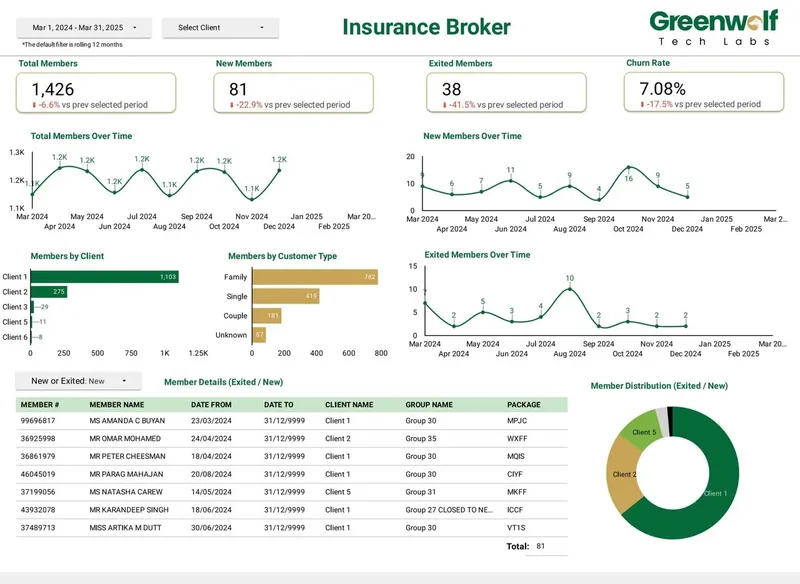
A project I led at Greenwolf Tech Labs. Monthly reports were assembled by hand from inconsistent .xls files sent by several insurers. The files now land in Google Drive, are mapped into one central sheet with the business rules applied, and feed a Data Studio dashboard.
- Report time: 4-5 hours to under 5 minutes
- Reporting accuracy: about 75% to 99%
- Visibility across insurers: limited to real time, with filters
FAQ
Frequently asked questions
Does Data Studio have a native Xero connector?
No. Data Studio's native connectors cover Google products such as GA4, Google Ads and Search Console, plus Sheets, BigQuery and several SQL databases. Xero data needs a partner connector, a Sheets route, a warehouse pipeline or exported reports.
Is there a free Xero connector for Looker Studio?
Looker Studio is called Data Studio again, and free options exist. Windsor.ai's forever free plan covers 1 data source and 1 account, and Coupler.io's free plan allows 1 account with manual refresh and 100 rows per run. Both suit testing more than a full monthly P&L.
Did Xero's 2026 API changes increase connector prices?
Xero began charging developers by connections and data egress on 2 March 2026, with paid tiers from AUD 35 to AUD 1,445 a month. Your Xero subscription is unchanged, but vendors carry the cost, so check current connector pricing before you commit to an annual plan.
Why is my Xero profit in Data Studio different from Xero?
Usually because of accounting basis, tracking filters, dates or account mapping. Check whether the dashboard uses cash or accrual, whether entries were backdated after the last load, and whether unassigned tracking lines are filtered out. Then reconcile against the Xero P&L run on the same basis and period.
What are the Xero API rate limits?
Xero allows 60 calls per minute, 5,000 calls per day and 5 concurrent calls per connected organisation, plus 10,000 calls per minute across one app. Exceeding them returns HTTP 429. Scheduled loads into a Sheet or BigQuery keep a dashboard well inside these limits.
Can I combine Xero with HubSpot, Shopify or ad data in one report?
Yes. For simple monthly views, blend on month, remembering that blends hold up to 5 sources with equality joins only. For revenue per customer or cost per acquired customer, load each source into a Sheet or BigQuery with matching customer and month columns and report from that table.
How often does Xero data refresh in Data Studio?
It depends on the route. Partner connectors query near live within caching, Sheets and warehouse tools refresh on your plan's schedule (daily on entry tiers, hourly or faster on higher ones), and manual exports refresh only when someone exports again.
Keep reading
Related pages
Get started
Tell me what the report has to answer
Send the question your team keeps asking and where the data lives today. I reply within one business day with how I would build it, which connectors it needs and what it would cost.
- Free 30-minute review of your data and reports
- A fixed price before any work starts
- Built in your Google account, so you own everything
Prefer email? harsh@greenwolftechlabs.com
Book a free review
Two lines is enough to start.