Connector guide
Facebook Ads to BigQuery: the native transfer, paid connectors and what each costs
You can send Facebook Ads to BigQuery with Google's own BigQuery Data Transfer Service, which has a Facebook Ads connector, or with a third-party connector, a custom script or CSV uploads. This guide is for marketing leads, ecommerce founders and analysts who want Meta spend and results in their own warehouse, usually to report them in Data Studio beside Google Ads, GA4 and sales data. I compare the routes with current prices, explain the Meta API rules that changed in 2026, and give a table design that keeps the numbers matching Ads Manager.

Quick answer
How do I connect Facebook Ads to BigQuery?
To connect Facebook Ads to BigQuery, create a Facebook Ads transfer in BigQuery Data Transfer Service, authorise it with a Meta user token, and pick a dataset. It loads fixed tables daily and refreshes the last 30 days. For custom fields, hourly refresh or no token renewals, use a connector such as Windsor.ai or Coupler.io.
- Google's Data Transfer Service has a generally available Facebook Ads connector with thirteen fixed tables.
- The native transfer runs daily at most and needs a new Meta token every 60 days.
- Since January 2026 Meta keeps hourly and unique-count breakdowns for only 13 months.
- For most ad accounts the connector or transfer fee outweighs BigQuery storage and query costs.
Can you connect Facebook Ads to BigQuery natively?
Yes. Facebook Ads is one of the few non-Google marketing sources that BigQuery Data Transfer Service supports directly, and the competing vendor tutorials on page one tend to leave that out. I checked Google's transfer documentation on docs.cloud.google.com in November 2026: the Facebook Ads connector is listed as generally available beside HubSpot, Klaviyo and Mailchimp, which are still in preview. Instagram, LinkedIn and TikTok are not on the list.
The native connector loads a fixed set of tables: AdAccounts, AdInsights, AdInsightsActions, AdInsightsMMM, Ads, AdCreatives, AdSets, Campaigns, AdImages, AdLabels, Businesses and CustomAudiences. Google's documentation notes that AdInsightsMMM support has been temporarily disabled since July 6, 2026. You cannot define custom reports, so if you need a breakdown the tables do not carry, such as age and gender or placement, you need a different route or a second pipeline beside it.
Which Facebook Ads to BigQuery route should you choose?
Use the native transfer if a daily load of standard tables is enough and someone can renew the token every two months. Use a paid connector if you need breakdowns, hourly data or a marketing team that never touches Google Cloud. Write your own script only if you already run other API pipelines. The table sets the four routes side by side.
| Route | How it is priced | Refresh | Best for | Main risk |
|---|---|---|---|---|
| BigQuery Data Transfer Service (native) | Billed by slot-hour of transfer compute | Daily, last 30 days reloaded | Teams already on Google Cloud that want standard tables | Token expires every 60 days; no custom reports |
| Flat-fee connector (Windsor.ai, Coupler.io) | Monthly plan by sources or accounts | Daily, or hourly on higher plans | Marketing-owned reporting with chosen fields and breakdowns | Plan limits on accounts and refresh |
| Usage-priced ETL (Estuary, Fivetran) | Data volume or rows moved | Near real time to daily | Data teams with a wider warehouse stack | Bills grow with breakdowns |
| Own script on the Marketing API | Engineering time and hosting | Whatever you build | Many accounts and unusual fields | Version changes and throttling break it |
How much does it cost to get Facebook Ads into BigQuery?
Expect to pay for the pipeline, not for BigQuery itself. These figures come from each vendor's pricing page and Google's documentation as I read them in November 2026; prices change, so confirm before you sign up.
The native transfer has no subscription, but it is not free. Google moved BigQuery Data Transfer Service to consumption pricing for third-party connectors, and an August 7, 2026 change, reported by cloudmagazin.com, removed the orchestration fee for Google's own sources such as Google Ads and GA4 while keeping Facebook Ads as a paid source billed by slot-hour. Google reserves up to 20 slots per hour that a transfer runs. A daily Facebook load that finishes in minutes uses far fewer slot-hours than a long Salesforce extract, but check the Data Transfer Service line on your Cloud bill after the first month.
Windsor.ai's Basic plan is $19 a month billed annually ($23 monthly) for 3 data sources with daily refresh; Standard is $99 a month annually ($118 monthly) with hourly refresh, and BigQuery is a destination on every plan. Its forever free plan covers 1 data source and 1 account. Coupler.io's Starter plan is $24 a month annually ($32 monthly) for 3 accounts with daily refresh, Active is $99 a month annually for 15 accounts, and Pro is $199 a month annually with hourly refresh; its free plan allows 1 account with manual refresh. Estuary publishes $0.50 per GB moved plus $100 a month per connector instance.
BigQuery's own charges are usually close to zero for Meta data. Google's pricing gives the first 10 GiB of storage and the first 1 TiB of on-demand queries free each month, then $6.25 per TiB queried. One warning: do not build on the BigQuery sandbox, because Google's sandbox documentation says its tables expire after 60 days and it does not support Data Transfer Service.
A worked example: one brand, two ad accounts, a year of data
Take an ecommerce brand with two Meta ad accounts, one for prospecting and one for retention, running about 200 active ads on an average day. It wants ad-level spend, impressions, clicks, purchases and purchase value every day, stored for year-on-year comparison and joined to Shopify orders in BigQuery.
In AdInsights that is roughly 200 ads times 365 days, about 73,000 rows a year. AdInsightsActions holds one row per action type per ad per day, so with ten tracked action types it grows to about 730,000 rows. At a generous 300 bytes a row that is around 220 MB in total, a small fraction of the 10 GiB free storage. A Data Studio report reading a date-partitioned summary view scans a few megabytes per chart, nowhere near the free 1 TiB of queries.
So the decision is about the pipeline. The native transfer costs only its slot-hours, but someone must renew the Meta token every 60 days and the brand gets no age, gender or placement breakdowns. Windsor.ai's Basic plan or Coupler.io's Starter plan, at $19 to $32 a month depending on vendor and billing, adds breakdowns and a friendlier interface. This is my own estimate from the published prices and limits above, not a quote; your row counts depend on ads, action types and breakdowns.
How do you set up the Facebook Ads BigQuery Data Transfer Service?
The setup takes under an hour if your Google Cloud project is ready. The steps below follow Google's Facebook Ads transfer documentation, plus the checks I add so the data can be trusted.
- Use a Google Cloud project with billing enabled, enable the BigQuery Data Transfer Service API, and create a dataset in the same region as your other marketing data.
- Give the person creating the transfer the BigQuery Admin role, or the specific transfer and dataset permissions Google lists, including bigquery.transfers.update.
- Create a Meta app and generate a long-lived user access token for a Meta user with access to every ad account you need.
- In BigQuery, create a transfer with Facebook Ads as the source, enter the token and ad account details, choose the tables and keep the default 24-hour schedule.
- Run a backfill for history. Google says you can go back as far as the source's retention allows, so pull it early.
- Reconcile one complete month of spend, clicks and purchases against Ads Manager, using the same attribution setting, before anyone builds a report.
- Put a calendar reminder 50 days out to renew the token, and add a daily check that the latest date in AdInsights is no more than two days old.
What are the limits of the native Facebook Ads transfer?
Four limits decide whether the native transfer is enough. Google's documentation states each one plainly, but you only feel them after go-live.
First, frequency: the minimum interval between runs is 24 hours, so there is no intraday data. Second, the refresh window: each run reloads up to the last 30 days of AdInsights and AdInsightsActions, and you cannot change that window. That is good for catching late conversions but means older corrections are not picked up. Third, the token: the long-lived Meta user access token expires after 60 days, and when it does the transfer fails until someone reauthorises it. Fourth, runtime: a Facebook Ads transfer that runs longer than six hours fails, which large multi-account backfills can hit.
The missing custom reports are the fifth, softer limit. If your Data Studio reports need demographic, placement or device breakdowns, plan a connector for those tables and keep the native transfer for the core daily facts, or move everything to one connector to keep a single source of truth.
How did Meta's 2026 API changes affect BigQuery pipelines?
They made storing history in BigQuery more valuable. Meta announced on October 13, 2025, as reported by ppc.land, that from January 12, 2026 the Ads Insights API would stop returning the 7-day view and 28-day view attribution windows. The 1-day click, 7-day click, 28-day click, 1-day engaged view and 1-day view windows remain. Any table or view that requested the removed windows started returning nothing for them.
The same change set new history limits: aggregate totals stay available for 37 months, but unique-count breakdowns and hourly breakdowns go back only 13 months, and frequency breakdowns only 6 months. If you will want hourly or reach-based comparisons beyond a year, the only way to have them later is to land them in BigQuery now and never delete them.
Meta's Insights best-practices page adds two rules that shape every pipeline. Insights refresh every 15 minutes and do not change after 28 days, which is why reloading the last 28 to 30 days on each run is the right design. And throttling is measured by load rather than call count: when an app pulls too much it gets error code 4, so scripts must pace their requests and watch the x-fb-ads-insights-throttle header.
How should Facebook Ads tables be designed in BigQuery?
Design for reloading, joining and attribution. Recent days are rewritten on every run, ad names change, and the attribution window you choose must be fixed and labelled so nobody compares 7-day click with 1-day view by accident.
Partition the insights table by date and cluster it by account and campaign. Keep campaign, ad set and ad names in dimension tables keyed on Meta's IDs. Store spend in the account currency with a currency column. Keep breakdown data in its own tables, because breakdown rows do not sum to the account total and follow shorter retention.
- One fact row per date, account, campaign, ad set and ad, with spend, impressions, clicks and link clicks.
- Actions and action values in a long table keyed by action type and attribution window, pivoted in a view.
- A merge on the last 30 days on each run, never a plain append, to avoid duplicates.
- UTM campaign values carried in a mapping table so Shopify, GA4 or CRM rows can join to Meta IDs.
- A summary view that matches the Data Studio report, with the data source set to owner's credentials.
When is Facebook Ads to BigQuery not worth it?
When you run one ad account, only report the last few months, and never join Meta to anything else. A partner connector straight into Data Studio is cheaper and simpler, and my Facebook Ads to Data Studio guide covers that route.
BigQuery is worth it when you need more than 13 months of hourly or unique-reach history, when Meta must sit beside Google Ads, TikTok, LinkedIn and GA4 in one model, or when spend has to be joined to orders or pipeline. Data Studio blends stop at 5 sources with equality joins only, and live connectors slow down as reports grow, whereas BigQuery can union every channel into one table with matching columns.
How I handle Facebook Ads to BigQuery projects
I start with a free review of your ad accounts, the questions your reports need to answer and the Google Cloud setup you already have. Then I recommend the cheapest route that will last, often the native transfer for core tables, and quote a fixed price for the pipeline, the table design, the summary views and the Data Studio dashboard on top.
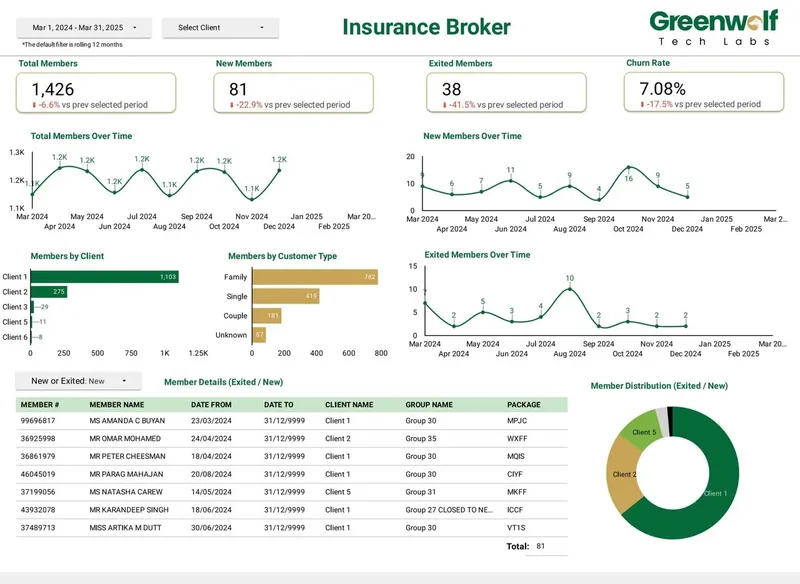
Everything lives in your Google Cloud project and your Meta Business account, with the token renewal date, reload window and views documented, so nothing depends on my login. On projects I've led at Greenwolf Tech Labs, an Australian insurance brokerage's insurer files were automated into a central data source feeding its dashboard, and report time fell from 4-5 hours to under 5 minutes. The same principle applies to Meta data: load once, model once, and let every report read the same tables.
Case study · Insurance brokerage, Australia
From 4-5 hours of spreadsheet work to a report in under 5 minutes
A project I led at Greenwolf Tech Labs. Monthly reports were assembled by hand from inconsistent .xls files sent by several insurers. The files now land in Google Drive, are mapped into one central sheet with the business rules applied, and feed a Data Studio dashboard.
- Report time: 4-5 hours to under 5 minutes
- Reporting accuracy: about 75% to 99%
- Visibility across insurers: limited to real time, with filters
FAQ
Frequently asked questions
Is the BigQuery Data Transfer Service for Facebook Ads free?
No. There is no subscription, but Facebook Ads is a paid source billed by the slot-hours each transfer uses, after Google's August 2026 pricing change. Google's own sources such as Google Ads and GA4 no longer carry that fee. Storage and queries are billed separately at normal BigQuery rates.
How often can Facebook Ads data refresh in BigQuery?
The native transfer runs at most once every 24 hours and reloads the last 30 days each time. For hourly data you need a connector plan that offers it, such as Windsor.ai Standard or Coupler.io Pro, or your own script. Daily is enough for most reporting.
Why did my Facebook Ads BigQuery transfer stop working?
The usual cause is the Meta long-lived user access token, which expires after 60 days. Other causes are a removed ad account permission, a user who left the Business Manager, or a backfill exceeding the six-hour run limit. Reauthorise the transfer and check the run history in BigQuery.
Can I get Instagram ads into BigQuery with the same transfer?
Instagram ads bought through Meta Ads Manager are part of the ad account, so their spend and results arrive in the Facebook Ads tables, with placement detail needing a breakdown the native transfer does not offer. Organic Instagram data is not a Data Transfer Service source and needs a connector.
How far back can I load Facebook Ads data into BigQuery?
Meta keeps aggregate totals for 37 months. Since January 12, 2026, hourly and unique-count breakdowns go back only 13 months and frequency breakdowns 6 months. Backfill as soon as you set up the pipeline and keep the history in BigQuery.
Why don't Facebook Ads numbers in BigQuery match Ads Manager?
Usually the attribution setting differs, the time zone differs, or recent days have not been reloaded. Meta insights keep changing for up to 28 days, so a table that only appends yesterday drifts. Match the attribution window, use the ad account time zone and reload the last 30 days.
Do I need a developer to connect Facebook Ads to BigQuery?
Not for the native transfer or a no-code connector; both are set up in a browser. You do need someone comfortable with Google Cloud permissions and SQL views to model the tables for Data Studio. A custom Marketing API script does need a developer.
Keep reading
Related pages
Get started
Tell me what the report has to answer
Send the question your team keeps asking and where the data lives today. I reply within one business day with how I would build it, which connectors it needs and what it would cost.
- Free 30-minute review of your data and reports
- A fixed price before any work starts
- Built in your Google account, so you own everything
Prefer email? harsh@greenwolftechlabs.com
Book a free review
Two lines is enough to start.